Ben's Blog

Category: I.T.

202 Articles
all out geekery, I.T., unix / linux ben June 16, 2012

Verizon's 4620L, a great device for the technically inclined

My family recently moved to a fairly remote area, the question of internet access has been a major one for the couple of months leading to the move. Besides satellite & dial-up, our only option was Verizon’s MiFi (3G or 4g if you’re lucky) in the form of a hotspot device: the 4620L.

I was afraid that the 4620L would try to be too smart and not let you tinker with it very much, very few decent reviews are available online and the official documentation is seriously lacking. Fortunately this couldn’t be further from the truth, it is a great little device that performs well and lets you turn all its knobs.

When using “USB tethered mode” I was afraid I’d need specific drivers and a software suite running but lo and behold, it actually just pretends to be an ethernet device over USB. Absolutely perfect to put a Linux router in front of it!

One thing that did not get properly QA’d is the “Enable DCHP Server” checkbox which simply doesn’t work. But guess what, I want to do my own routing and I’d like to avoid NATing from the 4620L to the Linux router. One way to circumvent this is to use the “Config File Download” and “Config File Upload” options which are meant as a way to backup & restore configuration but since the file is all intuitively labeled XML it’s easy to disable the DHCP server from there.

While you’re in there, you can also override the maximum number of “Available Wi-fi Connections” (5 when using 3G). They probably have this restriction so regular Joe user doesn’t hook a gazillion device and complain about speed over 3G. Reaching this limit is very easy nowadays.

A new mission

Verizon’s plan is pretty pricy and very metered… All we get is 5GB per month, each additional 1GB will cost us $10. Ouch… I need to configure the network to consume as few bytes as possible. Netflix is out, AdBlock is in, automatic updates of various types are out. Above all, my home server will now be doing some serious routing, the goal of which is to allow devices to be on the home intranet while minimizing their use of the internet.

No inbound connection

That’s right, the IP you get from Verizon is in the private range (RFC 1918), this means they are doing some NATing of their own. You can forward ports all you want on your 4620L this will have no effect. Your only option is some cumbersome hole punching.

We’ll be talking routing in a next post, I would have liked to find this information about the device & Verizon’s setup so I wanted to put it out there sooner rather than later.

I.T., unix / linux ben May 24, 2012

Change default home Unity lens

Because we don’t necessarily want the home lens to be the default one in Unity, and unlike other lenses it is hardcoded left & right. Here’s a little trick that will let you pick a different lens as the default for when you click on Dash.

edit the file: /usr/share/unity-2d/shell/dash/Dash.qml

replace line 79 “onDashActivateHome: activateHome()” by “onDashActivateHome: activateLens(X)” where X is the index of the lens you want to load (count from left to right starting from 0).

You’ll want to restart Unity for this to take effect.

Done!

I.T., maniacal paranoia, unix / linux ben May 14, 2012

Loopback & crypt: a filesystem, within an encrypted partition, within a file

So here we are, 2012 and physical media are going away really fast. We won’t even talk about CDs which have been relegated to the role of plastic dust collectors; hard drives even are being abstracted by a myriad of cloud based solutions. Their purpose is shifting towards a container for the OS and nothing else. Filesystems & their hierarchies become hidden in a bid to remove any need to organize files, rather, you are supposed to throw it all up in the cloud and search on metadata.

While moving away from physical media is convenient and inevitable, I like the hierarchical organization that directories provide. What’s more intuitive than a labeled container with stuff in it?

How can we detach our hard drives from their physical shells, move them around in an omnipresent cloud and keep them secure?

By creating a file, attaching it to loopback & creating an encrypted partition in it!

Here’s how to do it
  • Create a file that will be your soft hard drive with:

[bash]dd if=/dev/zero of=/tmp/ffs bs=1024 count=524288[/bash]

This will create a 512MB file (524288/1024).

  • Make sure that the loopback device #0 is free:

[bash]losetup /dev/loop0[/bash]

You should see something telling you that there is “No such device or address”.

  • Attach the soft hard drive to the loopback device:

[bash]sudo losetup /dev/loop0 /tmp/ffs[/bash]

  • And then make sure it was indeed attached by re-running:

[bash]losetup /dev/loop0[/bash]

  • Create an encrypted partition on your attached soft hard drive:

[bash]sudo cryptsetup –verify-passphrase luksFormat /dev/loop0 -c aes -s 256 -h sha256[/bash]

  • Open your encrypted partition:

[bash]sudo cryptsetup luksOpen /dev/loop0 ffs[/bash]

  • Create a filesystem in it:

[bash]sudo mkfs.ext3 -m 1 /dev/mapper/ffs[/bash]

  • And mount it like a regular disk:

[bash]sudo mount /dev/mapper/ffs /mnt[/bash]

  • When you are done using your encrypted soft hard drive you will want to umount it:

[bash]sudo umount /mnt[/bash]

  • Close it:

[bash]sudo cryptsetup luksClose ffs[/bash]

  • Detach it from loopback:

[bash]losetup -d /dev/loop0[/bash]

These steps can be automated of course. As a quick reminder, using the drive goes “loopback attach -> crypt open -> mount” and when you’re done it’s “umount -> crypt close -> loopback detach”.

That’s it! media-less & secure storage.

Tested on: Ubuntu 12.04 64b

I.T., maniacal paranoia ben May 14, 2012

OpenMPI distributed password cracker: crackzor

Download

crackzor_1.1.c.gz

Previous versions:

crackzor_1.0.c.gz

Quick start
  1. Download & extract with “tar zxvf crackzor_1.0.tar.gz”
  2. Make sure you have the right packages in place

    [bash]sudo apt-get install build-essential libopenmpi-dev openmpi-bin libssl-dev[/bash]

  3. Compile with

    [bash]mpicc -O3 crackzor.c -o crackzor -lm -lssl -lcrypto[/bash]

  4. Create a file called “machines” containing a newline separated list of every machine that are in your cluster, for example:

    [code]machine00.domain.com
    machine01.domain.com
    machine02.domain.com
    machine03.domain.com
    machine04.domain.com[/code]

  5. Open MPI uses SSH for communication between nodes, as such, you need to make sure that the node you will be launching crakzor from is able to do SSH key based authentication to all the other nodes in the cluster. For my example above, if machine00 is where you will be working from, you will want to

    [bash]ssh-copy-id machine0X.domain.com[/bash]

    where X E [0,4] (yes, machine00 needs to be able to SSH to itself).

  6. You now need to disseminate your executable across all the machines that will be running it:

    [bash]for machine in `cat machines`; do scp crackzor $machine:~; done[/bash]

    Pro-tip: having network storage attached to all the machines makes this step unnecessary.

  7. Run with:

    [bash]mpirun -npernode Y -machinefile machines crackzor fbade9e36a3f36d3d676c1b808451dd7 abcdefghijklmnopqrstuvwxzy 1 1[/bash]

    where Y is the number of cores each machine in your cluster has. If you are running this on machines with 2 CPUs with 8 cores each, Y = 8 * 2 = 16.

Tested on Ubuntu 10.04 64b / Ubuntu 12.04 64b / Ubuntu 14.04 64b

Screenshots

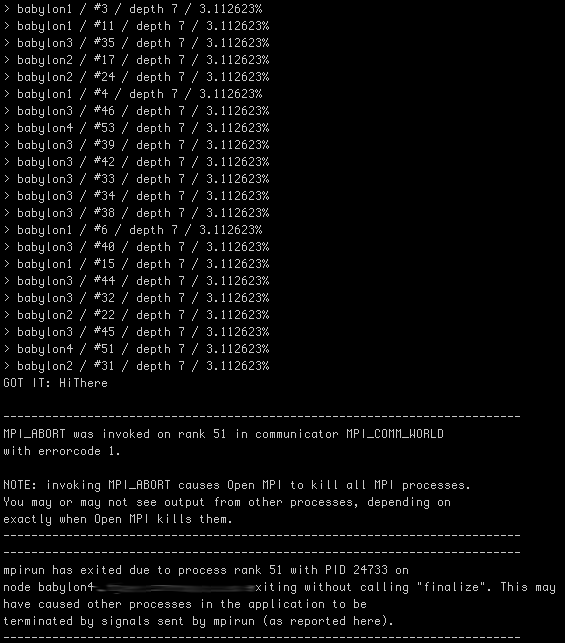
[bash]mpirun -npernode 16 -machinefile machines ./crackzor 7ca4793dcdff46ecda38e48d65b6c913 abcdefghijklmnopqrstuvwxzyABCDEFGHIJKLMNOPQRSTUVWXYZ 1 7[/bash]

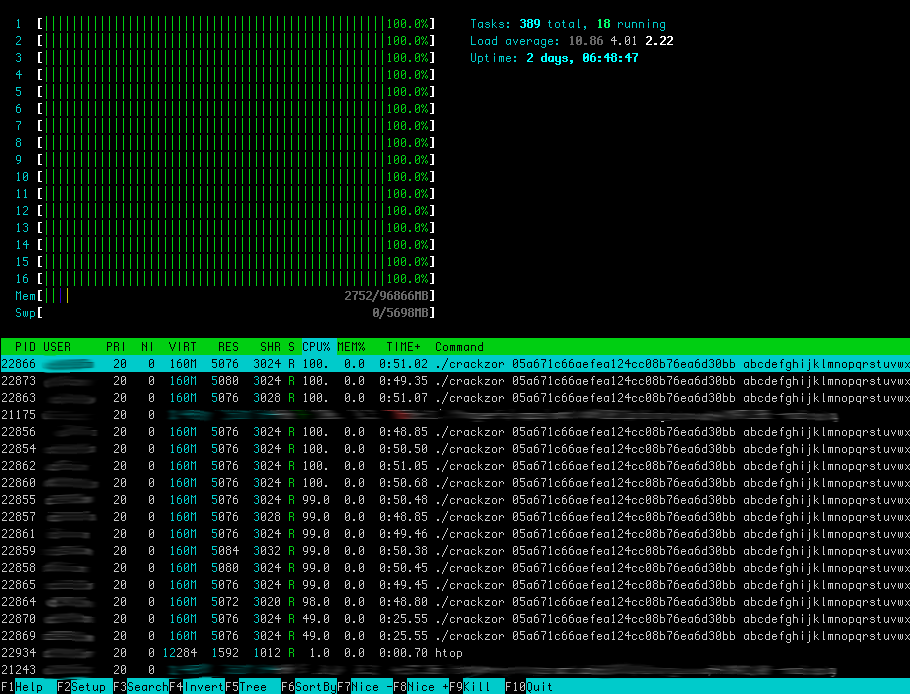
This is what “htop” looks like with a bunch of processes spawned & hammering every core:

Statistics

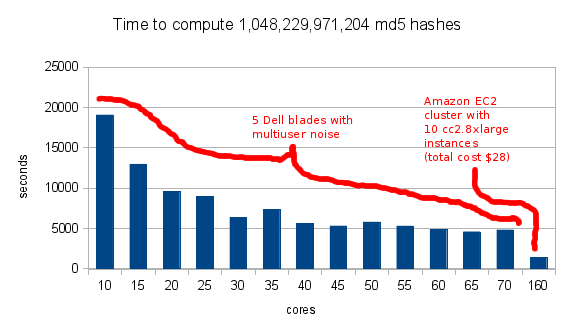
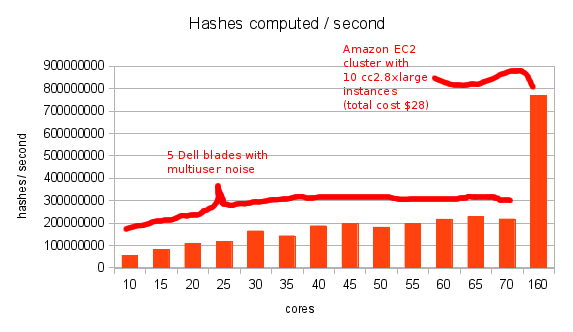
For the purpose of testing crackzor, we give it the md5 hash of an 8 character word and tell it to bruteforce it up to 7 characters. This insures that we will compute every permutation up to 7 character longs. The characters I asked it to permute are “abcdefghijklmnopqrstuvwxzyABCDEFGHIJKLMNOPQRSTUVWXYZ”, our sample space size is thus 52^7 + 52^6 + 52^5 + 52^4 + 52^3 + 52^2 + 52^1 = 1,048,229,971,204.

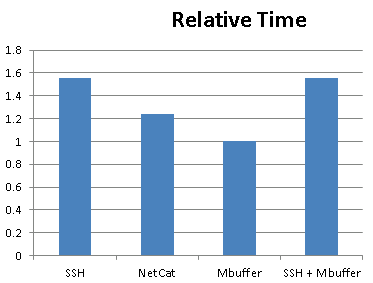
Here is the raw data, and here it is graphed:

I wish it would show the linear progression more but 3 things got in the way:

  1. approaching the machine’s actual number of cores on the Dell blades leaves little room for linear expansion
  2. which is emphasized in a multiuser environment where other users run other computation
  3. the EC2 bar flattens the graph a bit but I still wanted to show how it compares

Ideally I would run through a few iterations of EC2 to observe its progression but hey, it’s expensive :).

Limitations
  • Right now, the only hashing algorithm supported by crackzor is MD5. It can very easily be expanded upon.
  • I also may not be using the fastest MD5 method with the fastest call, distribution is what I’m interested in.
  • Distributing password cracking among multiple machines is throwing linear resources to an exponential problem!
I.T., unix / linux ben May 03, 2012

tcpdump full packets to a file

Because I always end up wasting 20 minutes looking it up.

[bash]tcpdump -i ethX -s 0 -w traffic.pcap[/bash]

I.T., unix / linux ben March 14, 2012

Add fault tolerance to cron noise

Not all cron jobs are created equal, and some of them can afford to fail sporadically before we need to worry about them. Maybe they rely on a third party server, and we don’t want the occasional fail to pollute our inbox.

Here is a little cron job wrapper I created that will suppress stderr but keeps track of the job’s returned exit codes. Above a certain threshold of consecutive abnormal exits it doesn’t suppress stderr anymore.

[bash]

# if the counter file doesn’t already exist we create/initialize it
if [ ! -f /tmp/counter_ri7g3 ] ;
then
echo 0 > /tmp/counter_ri7g3 ;
fi ;

# we pull the current counter
counter=`cat /tmp/counter_ri7g3` ;

# if the counter is still small, we send stderr to /dev/null
if [ $counter -lt 5 ] ;
then
$1 > /dev/null 2>&1 ;
# otherwise stderr will follow its normal path and find its way to email
else
$1 > /dev/null ;
fi ;

# lastly if running the $1 resulted in an abnormal exit, the counter is incremented
if [ ! $? = 0 ] ;
then
counter=`cat /tmp/counter_ri7g3` ;
echo "$counter+1" | bc > /tmp/counter_ri7g3 ;
# and if $1 exited normally, we reset the counter
else
echo 0 > /tmp/counter_ri7g3 ;
fi ;

[/bash]

a cron entry calling it looks as such:

[bash]

30 * * * * root /usr/local/bin/cron_wrapper "/path/to/script arg_1 arg_2"

[/bash]

I.T., maniacal paranoia ben February 21, 2012

IPv6 link-local surface analyzer

Download

ipv6_surface_analyzer_1.0.tar.gz

Quick Start

    1. make sure that nmap, ifconfig & arping are installed and in your path
    2. run as root

    tested on Ubuntu 11.10 64b

    Screenshot

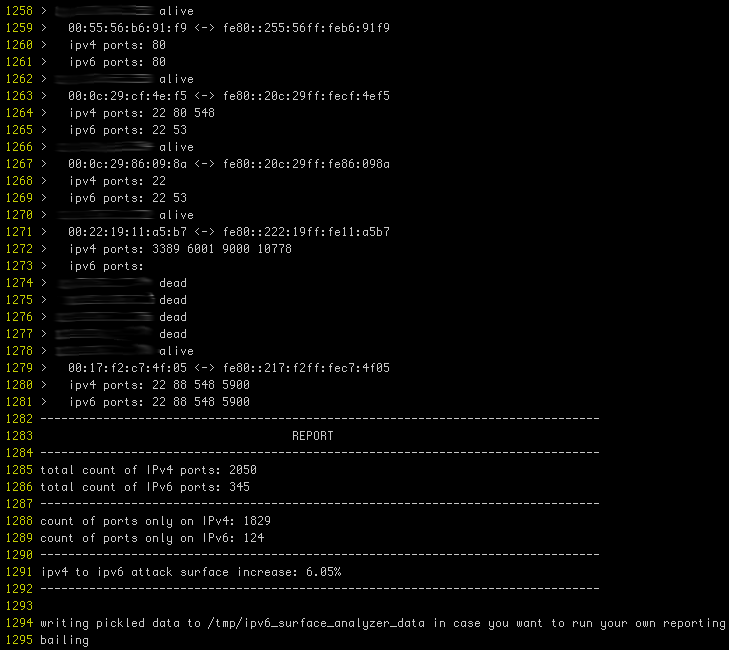
    (actual ips obfuscated)

    Purpose

    With more devices coming IPv6 ready out of the box, a shadow network is emerging that nobody is paying attention to.

    There’s Joe sysadmin, configuring a tight firewall for this new server, default deny, very restrictive & all. This is great but did he realize that there is nothing in front of IPv6? We are used to setting up iptables, ipfw, et cetera. Unfortunately ip6tables & ip6fw too often get forgotten.

    With IPv4, a device was manually configured or wasn’t configured until it got an address from DHCP. With IPv6 a device that is not manually configured will hop on the network with a link-local address and try to further discover its settings. In fact, IPv6 reserves a range of addresses for network discovery, these link-local addresses are based on the device’s mac address.

    Here is what ipv6_surface_analyzer.py does:

    • iterate through a given IPv4 range
    • for each address in the range, discover if a host sits behind it
    • port scan potentially found host on IPv4
    • infer IPv6 link-local address of host based on its mac address
    • port scan inferred IPv6 address

    The purpose of which is to establish by how much your attack surface is augmented by link-local IPv6.

    This threat threat is somewhat mitigated by its local nature and there are 2 reasons why:

    1. link-local isn’t routed and thus your visibility is bound to networks you have a presence on.
    2. Getting a host’s mac address is only possible while being on the same network.

    Local as it may be, having a shadow network providing a way to circumvent firewalls is quite risky.

    all out geekery, I.T. ben February 20, 2012

    Mame box

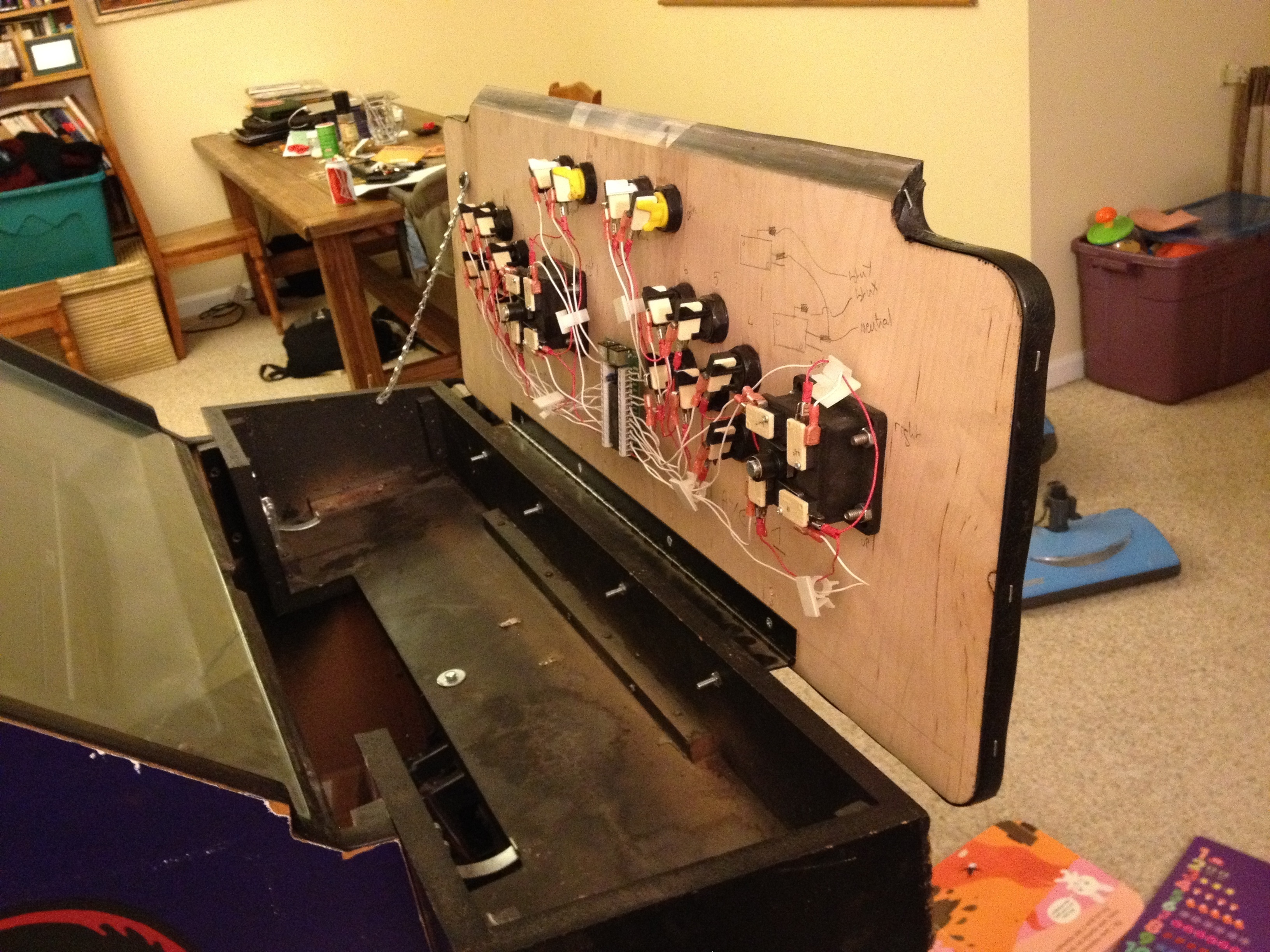
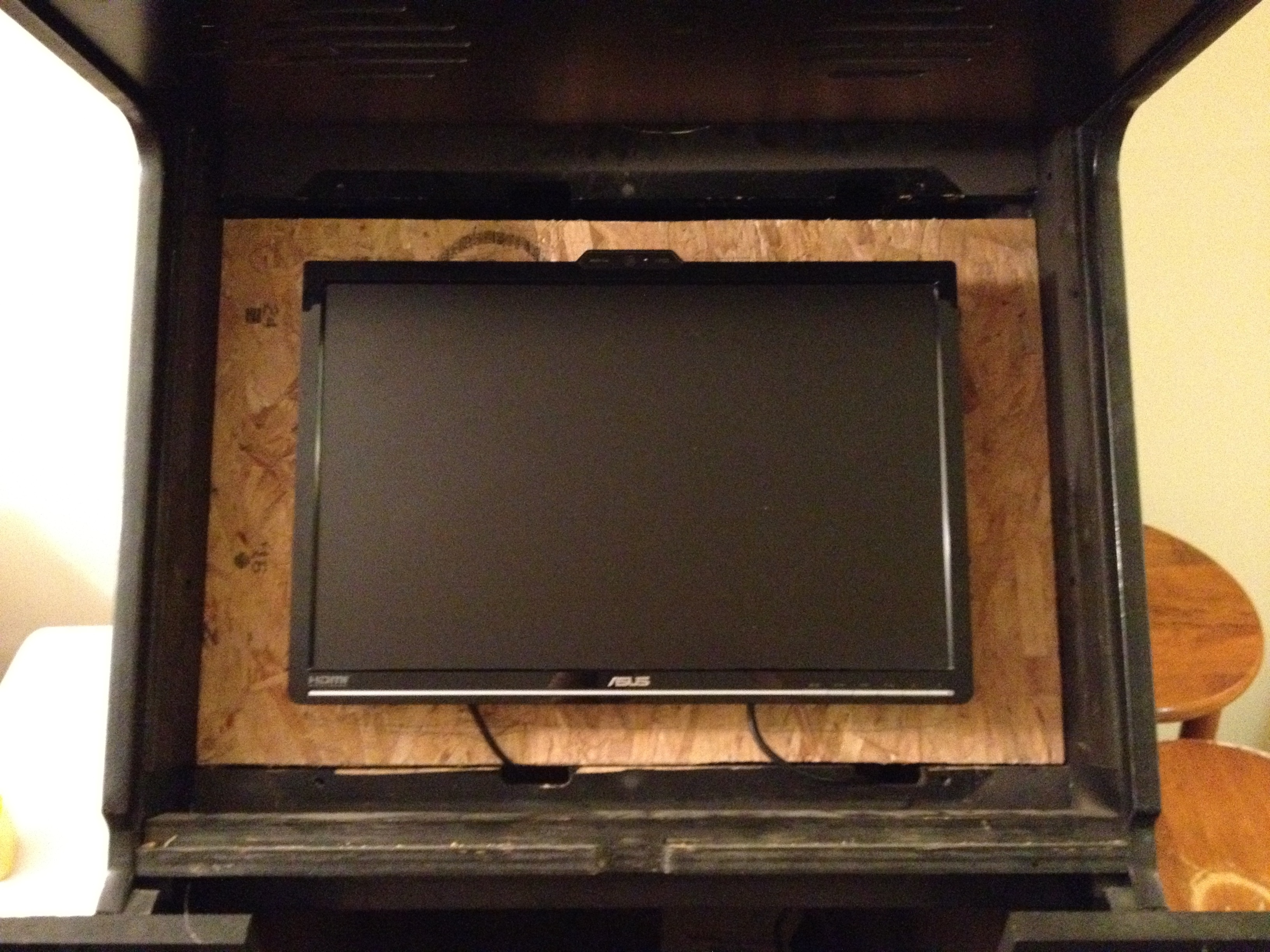
    Here’s another project that’s been on the back burner for a while: my new Mame box:

    This is the 5th arcade cabinet I turn into a Mame box. Gutting them always breaks my heart but having all the games in one cabinet with original artwork is very much worth it. The X-men cabinet is spacious, easy to work with and looks great.

    The buttons and joysticks were bought from X-arcade: www.xgaming.com

    And the control board to make them interface with a PC is an Ipac2: www.ultimarc.com

    all out geekery, crochet, I.T., self sustainability ben February 20, 2012

    Protected: Ultimate Megaman blanket

    This content is password-protected. To view it, please enter the password below.

    all out geekery, I.T. ben February 16, 2012

    MAC address to IPv6 link-local address online converter

    The converter

    It can also be addressed directly via:
    https://ben.akrin.com/ipv6_mac_address_to_link_local_converter/?mode=api&mac=52:74:f2:b1:a8:7f
    for all your API needs.

    The math

    Link-local IPv6 addresses are used as part of the IPv6 network auto-configuration process. Instead of getting an address via DHCP, a NIC will hop on the network with a link-local IPv6 address and with this will have to ability to do further configuration automatically (soliciting neighbors, router, et cetera).

    This link-local IPv6 is infered from the NIC’s mac address.

    A mac address is 48 bits, an IPv6 address is 128 bits. Here’s the conversion process step by step:

    1. take the mac address: for example 52:74:f2:b1:a8:7f
    2. throw ff:fe in the middle: 52:74:f2:ff:fe:b1:a8:7f
    3. reformat to IPv6 notation 5274:f2ff:feb1:a87f
    4. convert the first octet from hexadecimal to binary: 52 -> 01010010
    5. invert the bit at index 6 (counting from 0): 01010010 -> 01010000
    6. convert octet back to hexadecimal: 01010000 -> 50
    7. replace first octet with newly calculated one: 5074:f2ff:feb1:a87f
    8. prepend the link-local prefix: fe80::5074:f2ff:feb1:a87f
    9. done!

    Going the other way

    A converter to do the same operation in reverse is available here.

    Comments

    There have been a few interesting comments on this post, I encourage you to read them if you want to learn more about this mechanism. Specifically:

    • Why in the world would you flip that bit?
    • Bitnukl sharing a Windows trick
    3D modeling / printing, apiculture, I.T., self sustainability ben December 24, 2011

    Top-bar beehive design

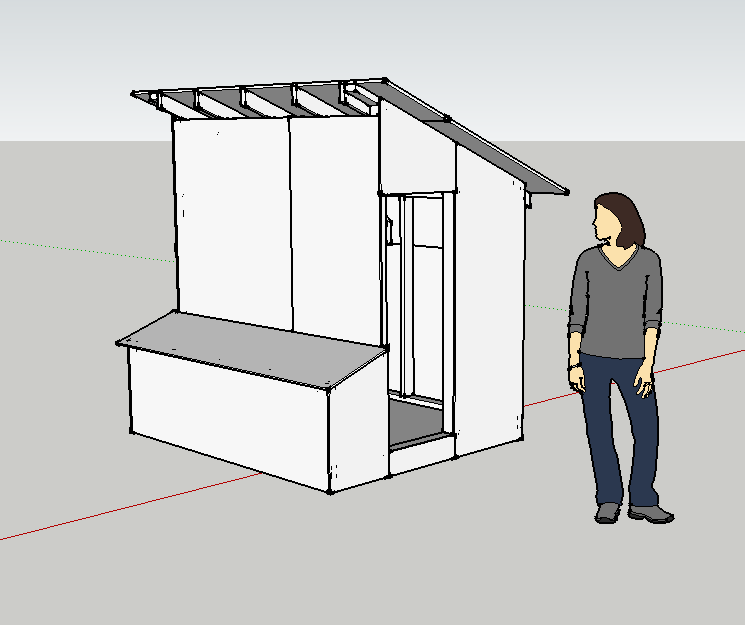
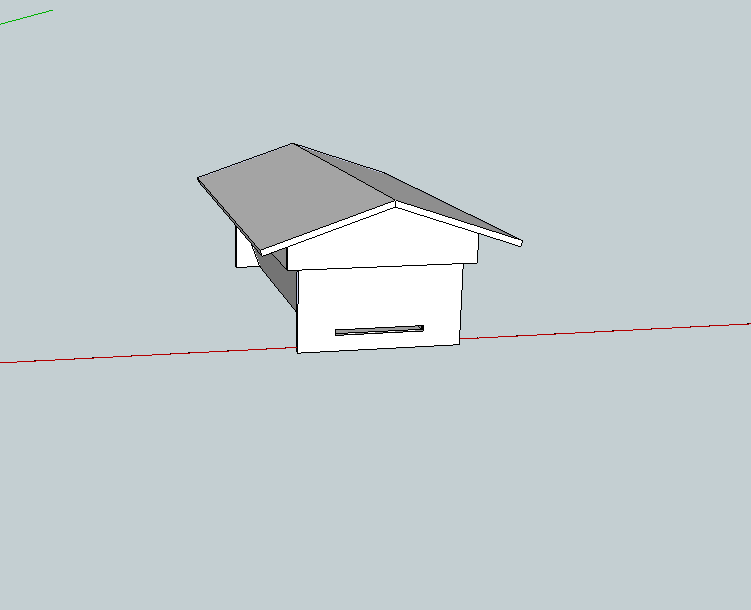
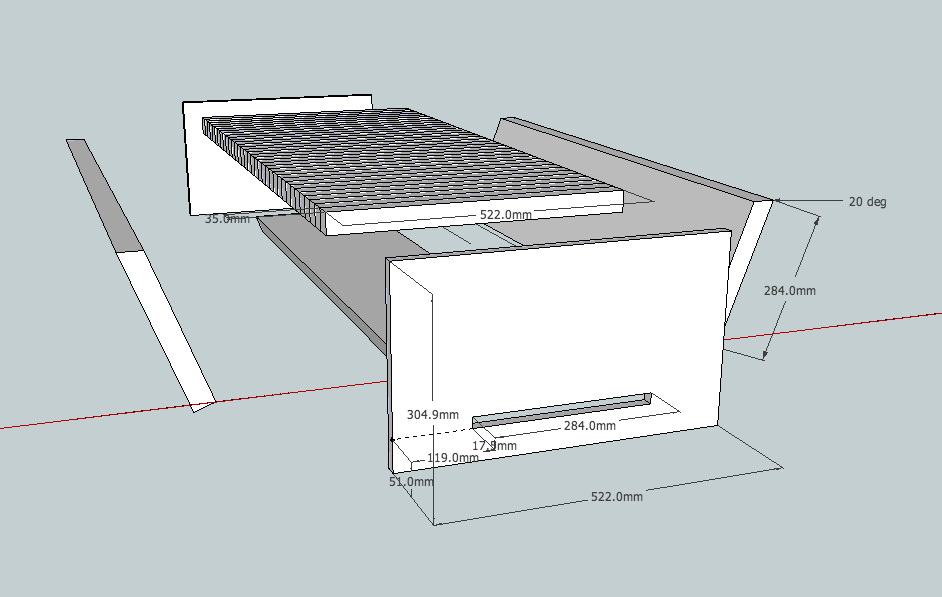
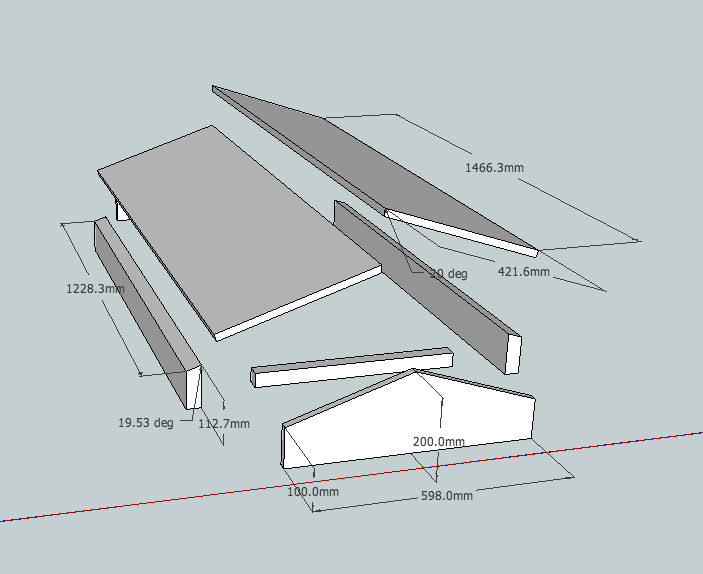
    Here’s a Google Sketchup design for a simple top-bar beehive.

    Some pics:


    Notes:

    Only 2 measurements really matter in the design of a top-bar beehive: the angle of the side panels (70 degrees) & the width of the top bars 35mm. They both pertain to bee behavior and this design has them both optimized. From what I gather, other measures are quite forgiving.

    This design is simple & well researched, I do not know yet how it will fare in practice, more to come on that.

    Material:

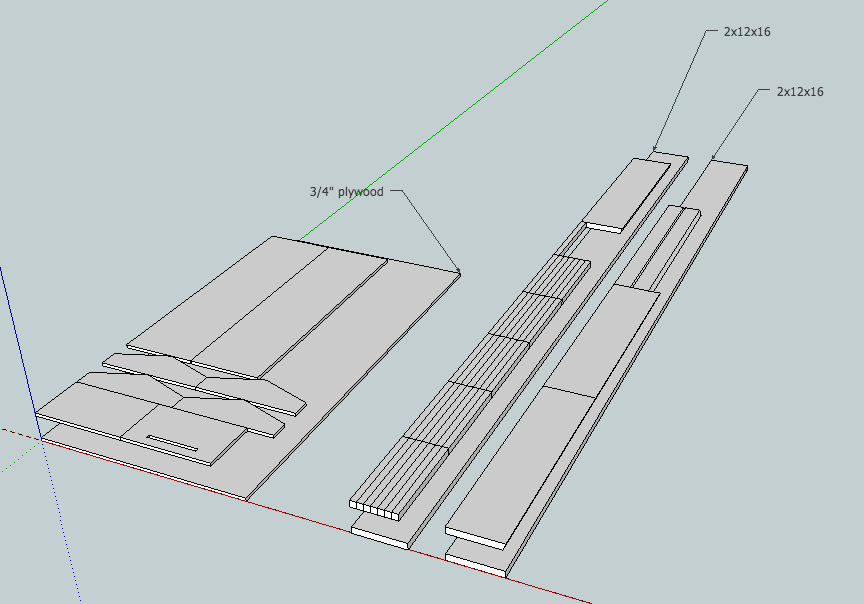
    All you’ll need as far as wood is concerned is a couple of 2x12x16 and a 3/4″ sheet of plywood:

    Lastly, all units are in millimeters but based on standard lumber sizes available at the hardware store.

    I.T., maniacal paranoia, unix / linux ben October 10, 2011

    Poor man’s 2FA: a simpler 2-factor authentication mechanism for SSH

    The problem with PAM based 2FA:
    • PAM does not get called when the SSH daemon does key based authentication. So your 2FA there only works with password authentication. This might be something you want but maybe not.
    • A PAM module based solution to 2FA is harder to implement
    The solution: Poor man’s 2FA!

    It is possible to add the ForceCommand directive to your sshd_config. Like the name suggests it simply runs a command after authentication and before the shell is spawned. This is a good spot to add an extra check, say another factor for authentication.

    The code:

    [bash]#!/bin/bash
    trap "echo "I’m sorry Dave. I’m afraid I can’t do that."; sleep 1 ; kill -9 $PPID ; exit 1" 2 20
    code=`od -a -A n /dev/urandom | head -2 | tr -d ‘ ‘ | tr -d ‘n’ | sed ‘s/[^a-zA-Z0-9]//g’ | awk ‘{print substr($0,1,5)}’`
    echo -e "Subject:$code\nFrom:root@server <root@server.com>\n2FA code in subject" | sendmail phone_number@carrier.com
    read input
    if [ $code = $input ];
    then
    `awk -F: ‘($1 == $LOGNAME) { print $7 }’ /etc/passwd`
    else
    kill -9 $PPID
    fi[/bash]

    That’s it really, save this to an executable file, replace the obvious variables and ForceCommand its ass.

    I.T., life in the U.S., maniacal paranoia ben September 17, 2011

    Avoid getting tracked in a datamining society

    Welcome to the information age! Memory is cheap, millions of records are copied in the snap of a finger and everybody wants your information. This is called data-mining and everybody is doing it essentially to better advertise to you. These databases of your facts & habits are often sold and even hacked. It is time to ponder how little control you have over your own information. And when you do so, think not only about the information you give but above all about the information that can be inferred from it.

    Compiled bellow is a list of tips for avoiding getting tracked in modern society. They range from simple good practice to paranoia. Obviously you could go live as a hermit in the woods and be untraceable. Feel free to comment on anything I missed and I’ll add to the post.

    Day to day life

    • Broadcast the least information possible. Does your state require license plates in the front & rear? 19 states don’t, google them. Police cameras automatically scan all the license plates they see, why double your chances? Your license plates are also often recorded when you drive through tolls.
    • Pay everything in cash, credit/debit card transactions can easily place you in space and time. Moreover, encoded in the magnetic stripe is your name, stores know everything you buy and when you buy it. This is pant creaming data for the marketing geniuses trying to figure out ways to make you consume more.
    • Avoid customer rewards programs. An even better way to tie information back a a customer that might use multiple methods of payment. Still want the sweet deals? Don’t use your real info when signing up, or just don’t sign up, the cashiers often have default cards to scan.
    • Avoid mail-in rebates. They are nothing more than a way for you to sell your information.

    I.T. life

    This is a dense section, no surprise this is where most data mining occurs.

    • Don’t let email load remote content

    This is commonly used as a way to know if you’ve opened the email, at what time you opened it, where you opened it from (IP geolocation) and what your email client was. The technical explanation is that some email have HTML formatting with images included. These images can be embedded in the email itself or referenced to a remote server. In the later case, the remote server will for example enable PHP parsing for JPEG files, execute code to track you and then feed the image to the email client which never had a clue it was loading a “special” image. This is all transparent to the user and the email client.

    • No smartphone GPS tracking

    Let’s take an example: you enable Google Latitude on your cell phone to share your location with friends and get to know fun facts about how much you travel. The information you give Google are geographic coordinates, the informations inferred from it are where you live, where you work and whether or not you pull your 40 hours a week there.

    • Let’s go further: no smartphones at all!

    Apple’s Iphones and Google’s Android phones gather location information WHETHER YOU WANT IT OR NOT. That’s right, you can turn off GPS all you want your phone still recurringly reports back to Apple & Google telling them not only where they are but also which other wireless devices they see around.

    More info here from the most excellent Samy Kamkar.

    The tech giants are involved in a major data gathering process where they use you to create a comprehensive map of the wireless spectrum. This is both an awesome project using crowdsourcing to accomplish a daunting task & a scary invasion of privacy. Because it doesn’t ask you, and because you take it home and so it reports your wireless router and so now everytime you use a regular computer connected to said router, they know exactly where you are. It is scary because even if you could turn it off, others around you are passively reporting your location.

    • Even further? no cell phones! your location can be triangulated from cell towers.
    • Forget social networks, even if you use fake information. Sooner or later, your contacts, something you said, someone that said something about, will be traced back to your real self.
    • Remove EXIF data from the pictures you distribute online, especially if they were taken with smartphones.
    • SSL encryption, SSL everywhere. In fact any time you configure a connection (IMAP, FTP, HTTP) make sure that it uses an encrypted mechanism. The number of network taps are growing and you don’t want to make the job easier on them.
    • Review pictures you distribute online for license plate numbers, bills laying on tables and other identifiers.
    • A strong firewall not just for incoming traffic. Nowadays devices are very noisy, from Bonjour to checking for updates the packets coming out of your network interfaces without your knowledge are plentiful and growing. And every time to send a packet out, your presence is known. A firewall with rules on outgoing traffic is a good idea to keep unwanted traffic to a minimum.
    • Don’t give your email address to anyone that asks for it, use services like mytrashmail.com or even better yet, get a new email account every time. This way if they sell your information you will know right away since you only have 1 email account per company. You can then check they EULA and see if maybe they boast of not selling your information, Make them accountable! On a side note Gmail offer the capability of adding a plus (“+”) following by a string of your choosing to your regular email address. For example if your email address is address@gmail.com, Gmail will also accept mail to address+sillysite@gmail.com. This way you can segregate mail by company with the convenience of having it all go to the same account. The caveat to that is that “+” is often considered as an invalid character in an email address even though it is a valid character.
    • Adblock is one of the best plugin for your web browser (Firefox or Chrome). It removes ads thus significantly enhancing your browsing experience. By negating traffic to advertisement servers, you are denying their chance to data mine the crap out of you. Browser fingerprinting is one of many techniques used with an argument often made that the combinations of browser related software are so plentiful that your browser can be uniquely identified. Permanent cookies are also used to keep an eye on your web whereabouts.

    And even if you follow all these steps, you are not 100% untraceable online.

    The path of maximum sheep

    Finally, for when you have to give information, try and be a generic & blend as possible.

    • Your name is needed to sign up for something? John Smith.
    • Need a new car? White Honda Civic, no bumper stickers, no vanity plates.
    • Gotta find a new name for a PC? Linksys.
    • Need a username for that shitty forum? User2656, don’t use the one you use everywhere else or one thing leading to another, it can most likely be tied to your real identity.
    I.T., unix / linux ben August 01, 2011

    Python SNMP simple example to get 1 OID

    Because it took me forever to piece this simple code together

    [python]
    import netsnmp
    session = netsnmp.Session( DestHost=’your.host.com’, Version=2, Community=’public’ )
    vars = netsnmp.VarList( netsnmp.Varbind(‘.1.3.6.1.4.1.2021.8.1.101.1’) )
    print( session.get(vars) )
    [/python]

    I.T., unix / linux ben July 26, 2011

    Shell scripting – updating a file holding a counter

    [bash]counter=`cat /tmp/counter` ; echo "$counter+1" | bc > /tmp/counter[/bash]

    note that loading the /tmp/counter into the variable is a necessary indirection, the following:

    [bash]echo "`cat /tmp/counter`+1" | bc > /tmp/counter[/bash]

    would not work as the output redirection gets triggered before the cat gets a chance to happen, so the file is emptied too early.

    all out geekery, I.T. ben July 19, 2011

    Datasets!

    Here are a bunch of datasets accumulated over the years for different projects, have fun with them! If you have something to augment this list with, let me know.

    U.S. zip codes

    basic english words

    condensed english words

    english dictionnary

    miscellaneous easy to type

    star trek references

    first names

    significant numbers

    common passwords

    places

    king james bible words

    book of mormon words

    koran words

    U.S. counties

    I.T., maniacal paranoia, unix / linux ben May 26, 2011

    Adding an Endace card to Symantec’s DLP

    I decided to publish this hack as I could not find an iota of information about getting an Endace card working With Symantec’s DLP (previously Vontu) on RedHat.

    After you’ve installed the module for your Endace card, you recycle your sensor and are confronted with the following error message:

    Endace DAG driver is not available
    Packet Capture was unable to activate Endace device support. Please see PacketCapture.log for more information.

    A look at /var/log/Vontu/debug/PacketCapture.log yields:

    ERROR PacketDriverFactory - Driver Dag is unavailable: libdag.so.3: cannot open shared object file: No such file or directory [PacketDriverFactory.cpp(423)]

    do an

    updatedb
    locate libdag.so

    You will notice you just compiled a version more recent than libdag.so.3. As it turns out, Symantec DLP v11.0 does NOT know how to use the generic libdag.so nor the latest libdag.so.4.0.2 you just compiled. I’ve tried many tricks mostly with symlinks and I just couldn’t get it to use libdag.so.4.

    Hold on to your pants as I explain the unholy hack that made it work:

    edit /opt/Vontu/Protect/lib/native/libPacketDriverDag.so.11.0.0 , this is a binary file so using a hex editor is a good idea although vi works fine. Also, do respect placement very carefully, you will be changing 1 character and 1 character only.

    search for libdag.so.3 and replace its 3 by a 4.

    Recycle your server again and it should be happy about life 🙂

    all out geekery, I.T. ben May 20, 2011

    Spamassassin stats

    54.46% of all emails received on akrin so far got flagged as spam by the excellent Spamassassin. This is actually not too bad compared to high profile mail service providers.

    1 email that takes the cake is with a spam score of 42.2 (anything above 4 is not relayed):

    Return-Path: <comicalbp@sosmoteurs.com>
    Received: from 201-93-229-84.dsl.telesp.net.br (201-93-229-84.dsl.telesp.net.br [201.93.229.84])
    From: "Chase bank" <mailserver.id3373332193ib@chase.com>
    To: <XXXXXX@akrin.com>
    Subject: urgent security notification for client!
    X-Spam-Level: ******************************************
    X-Spam-Status: Yes, score=42.2 required=5.0

    Content analysis details:

    pts rule name              description
    ---- ---------------------- --------------------------------------------------
    2.0 RCVD_IN_BL_SPAMCOP_NET RBL: Received via a relay in bl.spamcop.net [Blocked - see <http://www.spamcop.net/bl.shtml?201.93.229.84>]
    3.0 RCVD_IN_XBL            RBL: Received via a relay in Spamhaus XBL [201.93.229.84 listed in zen.spamhaus.org]
    0.9 RCVD_IN_PBL            RBL: Received via a relay in Spamhaus PBL
    0.6 RCVD_IN_SORBS_WEB      RBL: SORBS: sender is a abuseable web server [201.93.229.84 listed in dnsbl.sorbs.net]
    1.8 URIBL_PH_SURBL         Contains an URL listed in the PH SURBL blocklist [URIs: nilvert.com]
    1.9 URIBL_AB_SURBL         Contains an URL listed in the AB SURBL blocklist [URIs: nilvert.com]
    1.5 URIBL_WS_SURBL         Contains an URL listed in the WS SURBL blocklist [URIs: nilvert.com]
    1.5 URIBL_JP_SURBL         Contains an URL listed in the JP SURBL blocklist [URIs: nilvert.com]
    2.0 URIBL_BLACK            Contains an URL listed in the URIBL blacklist [URIs: nilvert.com]
    3.5 BAYES_99               BODY: Bayesian spam probability is 99 to 100% [score: 1.0000]
    4.3 HELO_DYNAMIC_HCC       Relay HELO'd using suspicious hostname (HCC)
    4.4 HELO_DYNAMIC_IPADDR2   Relay HELO'd using suspicious hostname (IP addr 2)
    0.0 FH_HELO_EQ_D_D_D_D     Helo is d-d-d-d
    1.4 FROM_LOCAL_HEX         From: localpart has long hexadecimal sequence
    1.9 TVD_RCVD_IP            TVD_RCVD_IP
    2.8 TVD_PH_SUBJ_URGENT     TVD_PH_SUBJ_URGENT
    0.7 SPF_NEUTRAL            SPF: sender does not match SPF record (neutral)
    2.3 SPOOF_COM2COM          URI: URI contains ".com" in middle and end
    1.6 HTML_IMAGE_ONLY_24     BODY: HTML: images with 2000-2400 bytes of words
    0.0 HTML_MESSAGE           BODY: HTML included in message
    1.4 MIME_QP_LONG_LINE      RAW: Quoted-printable line longer than 76 chars
    0.1 RDNS_DYNAMIC           Delivered to trusted network by host with dynamic-looking rDNS
    2.8 DOS_OE_TO_MX           Delivered direct to MX with OE headers
    I.T., unix / linux ben April 20, 2011

    Mounting a partition from a disk image

    So you’ve dded a disk and you would like to mount its partitions from the resulting image file. Easy enough, first:

    [bash]fdisk -l -u /path/to/disk.img[/bash]

    Which will yield a variation of the following output:

    [bash]You must set cylinders.
    You can do this from the extra functions menu.

    Disk disk.img: 0 MB, 0 bytes
    255 heads, 63 sectors/track, 0 cylinders, total 0 sectors
    Units = sectors of 1 * 512 = 512 bytes
    Sector size (logical/physical): 512 bytes / 512 bytes
    I/O size (minimum/optimal): 512 bytes / 512 bytes
    Disk identifier: 0x00000080

    Device Boot Start End Blocks Id System
    disk.img1 63 15631244 7815591 82 Linux swap / Solaris
    disk.img2 * 15631245 113290379 48829567+ 83 Linux
    Partition 2 has different physical/logical endings:
    phys=(1023, 254, 63) logical=(7051, 254, 63)
    disk.img3 113290380 210949514 48829567+ 83 Linux
    Partition 3 has different physical/logical beginnings (non-Linux?):
    phys=(1023, 254, 63) logical=(7052, 0, 1)
    Partition 3 has different physical/logical endings:
    phys=(1023, 254, 63) logical=(13130, 254, 63)[/bash]

    Partitions available on the disk image are listed as disk.img1, disk.img2 & disk.img3. Great, pick which one you want to mount and look at where it starts.
    disk.img2 starts at 15631245, multiply that by 512. 15631245 * 512 = 8003197440.
    Finally, mount the disk image at the offset you calculated as such:

    [bash]mount -o loop,offset=8003197440 -t auto /path/to/disk.img /mnt/disk_img_partition2[/bash]

    And done!

    I.T., maniacal paranoia, unix / linux ben April 12, 2011

    2-factor authentication & writing PAM modules for Ubuntu

    Download

    2ndfactor.c

    The problem

    Passwords are often seen as a weak link in the security of today’s I.T. infrastructures. And justifiably so:

    • re-usability, which we’re all guilty of, guarantees that credentials compromised on a system can be leveraged on many others. And given the world we live in, password re-use is inevitable, we just have too many accounts in too many places.
    • plain text protocols are still used to transmit credentials, and the result is that they are exposed to network sniffing. This is worsened by the increase in wireless usage which broadcasts information. Telnet, FTP, HTTP come to mind but they aren’t the only ones.
    • lack of encryption on storage is a flaw that too often makes it way into architecture design. How many databases have we heard about getting hacked & dumped? How many have we not heard about?
    • password simplicity & patterns are also factors weakening us against bruteforce attacks.

    So far, the main counter measure we’ve see out there is complexity enforcement. Sometimes IP restriction, or triggering warnings on geographic inconsistencies (Gmail, Facebook). But these barely help alleviate problem.

    A solution

    One hot solution that is making its way into critical systems (banks, sensitive servers) is Multi-factor authentication, and by “multi” we’ll stick to 2-factor authentication (2FA) because, well 3 factor authentication might be getting a little cumbersome :). The goal is to have more than one mean of establishing identity. And as much as possible, the means have to be distinct in order to reduce the chances of having both mechanisms compromised.

    Let’s see how to implement 2FA on an Ubuntu server for SSH. Ubuntu uses PAM (Pluggable Authentication Modules) for SSH authentication among other things. PAM’s name speaks for itself, it’s comprised of many modules that can be added or removed as necessary. And it is pretty easy to write your own module and add it to SSH authentication. After PAM is done with the regular password authentication it already does for SSH, we’ll get it to send an email/SMS with a randomly generated code valid only for this authentication. The user will need access to email/cell phone on top of valid credentials to get in.

    Implementation

    Let’s do an ls on /lib/security, this is where the pam modules reside in Ubuntu.

    Let’s go ahead and create our custom module. First, be very careful, we’re messing with authentication and you risk locking yourself out. A good idea is to keep a couple of sessions open just in case. Go ahead and download the source for our new module.

    Take a look at the code, you’ll see that PAM expect things to be laid out in a certain way. That’s fine, all we care about is where to write our custom code. In our case it starts at line 35. As you can see, the module takes 2 parameters, a URL and the size of the code to generate. The URL will be called and passed a code & username. It is this web service that will be in charge of dispatching the code to the user. This step could be done in the module itself but here we have in mind a centrally managed service in charge of dispatching codes to multiple users.

    Deploying the code is done as follows:

    [bash]gcc -fPIC -lcurl -c 2ndfactor.c
    ld -lcurl -x –shared -o /lib/security/2ndfactor.so 2ndfactor.o[/bash]

    If you got errors, you probably need to first:

    [bash]apt-get update
    apt-get install build-essential libpam0g-dev libcurl4-openssl-dev[/bash]

    Do an ls on /lib/security again and you should see our new module, yay!

    Now let’s edit /etc/pam.d/sshd, this is the file that describes which PAM modules take care of ssh authentication, account & session handling. But we only care about authentication here. The top of the file looks like:

    [code]# PAM configuration for the Secure Shell service

    # Read environment variables from /etc/environment and
    # /etc/security/pam_env.conf.
    auth       required     pam_env.so # [1]
    # In Debian 4.0 (etch), locale-related environment variables were moved to
    # /etc/default/locale, so read that as well.
    auth       required     pam_env.so envfile=/etc/default/locale

    # Standard Un*x authentication.
    @include common-auth[/code]

    The common-auth is probably what takes care of the regular password prompt so we’ll add our module call after this line as such:

    [code]auth       required     2ndfactor.so base_url=http://my.server.com/send_code.php code_size=5[/code]

    The line is pretty self descriptive: this is an authentication module that is required (not optional), here’s its name and the parameters to give it.

    send_code.php can be as simple as:

    [php]<?php mail( "{$_GET[‘username’]}@mail_server.com", "{$_GET[‘code’]}" ) ; ?>[/php]

    Or a complex as you can make it for a managed, multi-user, multi-server environment.

    Lastly, edit /etc/ssd/sshd_config and change ChallengeResponseAuthentication to yes. Do a quick

    [bash]/etc/init.d/ssh restart[/bash]

    for the change to take effect.

    That’s it! try and ssh in, the code will be dispatched and you will be prompted for it after the usual password. This was tested on Ubuntu 10.04 32b / Ubuntu 10.04.2 64b / Ubuntu 11.04 64b / Ubuntu 12.04 64b.

    A few disadvantages of this 2FA implementation worth mentioning
    • more steps required to get in
    • doesn’t support non TTY based applications
    • relying on external services (web service, message delivery), thus adding points of failure. Implementing a fail-safe is to be considered.
    • SSH handles key authentication on its own, meaning a successful key auth does not go through PAM and thus does not get a chance to do the 2nd factor. You might want to disable key authentication in sshd’s config.
    all out geekery, I.T., poultry, self sustainability ben April 10, 2011

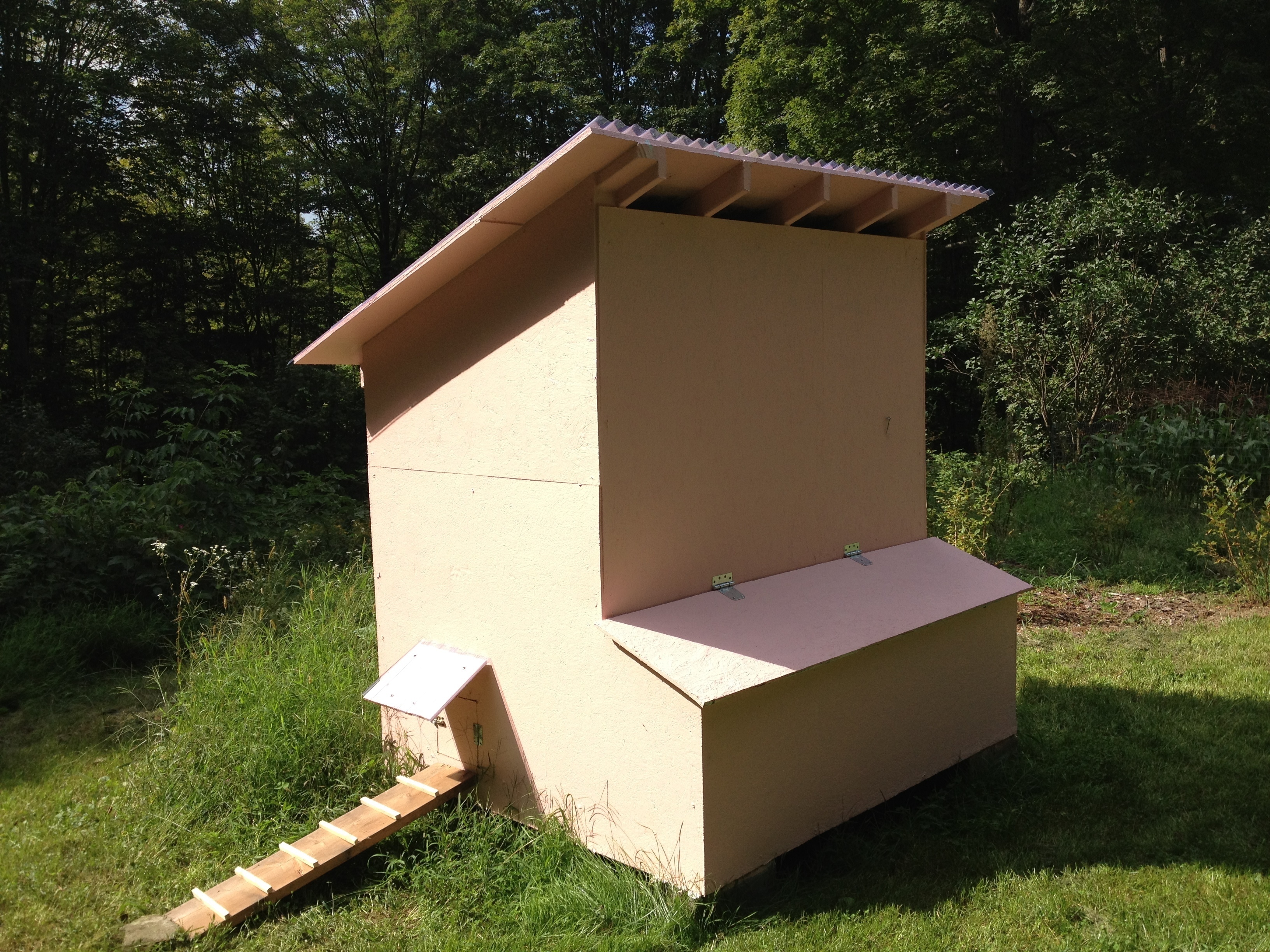
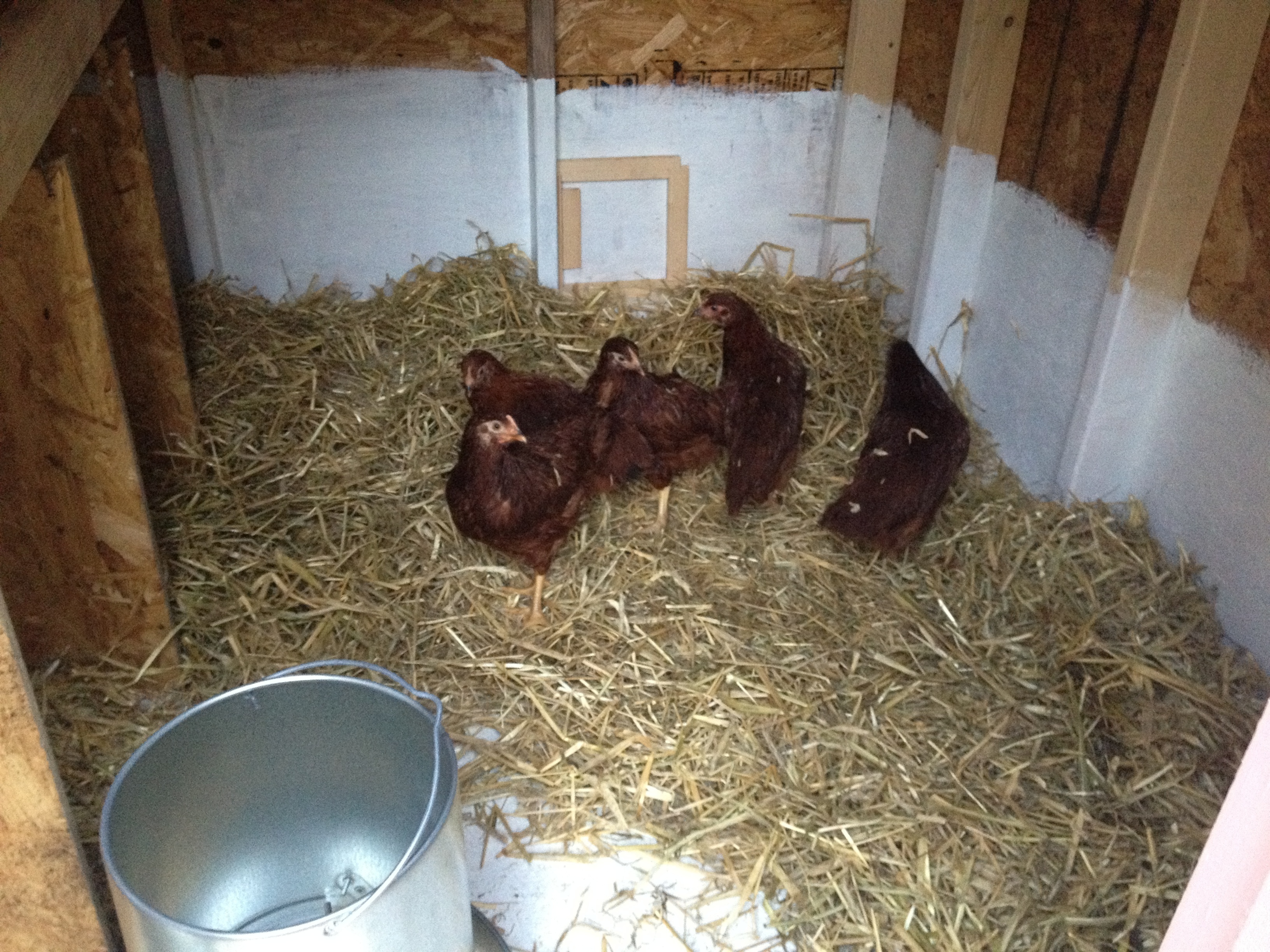
    Chicken cam

    As part of my CCTV installation at home, a cam is placed in the chicken coop. This has very little direct purpose although it is fun to watch chicken behaviors with no humans around. And I guess it is nice to check if we have eggs or if everything is all right.

    Really, this is an experiment towards what our future farm will be like. We’d like for people to be able to watch how their food is grown. Maybe even interact remotely with the animals.

    It’s a little slow due to my 3Mbps connection and the proxying but have fun with it:

    The chicken cam has been disabled as we get ready to move to a new state.

    A year a and half after our big jump, it has been re-enabled 🙂

    I.T., video games ben April 10, 2011

    And Minecraft for all

    With video games becoming ever more realistic, one game stands out and defies the pursuit of polygons: Minecraft. With the charm of old video games, big fat pixels and a very square geometry. It stands to remind us of a time when video games left room for imagination.

    This is a pig

    It has the charm of an old Ultima and sandbox spirit of Legos. Indeed, there is no purpose in the game other than just build random stuff. And to get the material needed to create, it will take some serious world exploration. The world generator is very well tuned and will leave you in awe of the majestic landscapes & mystical caves it comes up with.

    Can you feel the wind on your cheeks?

    As with Legos, the possibilities are endless ranging from basic fort construction to advanced engineering.


    A slight downside is in the choice of technology: Java. Which as always sucks the everliving crap out of all the resources your machine has, both on the client and the server. Which is ironic given the simplistic nature of the game, it should have a very low footprint on the system.

    I’m running a server on Akrin, feel free to ask for a whitelist if you feel like building cool things with cool people.

    all out geekery, I.T. ben February 16, 2011

    Markov chains based random text generation

    We’ve already seen how to use Markov chains to generate random words that are based on the essence of a previously analyzed corpus. Well the exact same algorithm can be applied to text. The base entities become words instead of letters. I make punctuation be part of the entities, this way, sentence flow becomes part of the extracted statistical essence.

    Feel free to send me ideas of cool corpora to analyze.

    You can play with it here:

    Posts pagination

    ← Previous 1 … 7 8 9 Next →

    This blog is solar powered

    Interactive

    Handwriting Capture
    Mandalagaba
    IPv6 link-local to MAC converter
    IPv6 MAC to link-local converter
    Markov Text Generation
    Markov Word Generation
    Markov Music Generation
    Duplogrifier
    Flood Fill Algorithms
    Homestead Metrics
    RGB Playground
    Web Games

    Categories

    • aesthetics111
      • plots54
      • specular holography6
    • Books3
    • I.T.202
      • 3D modeling / printing21
      • AI6
      • all out geekery36
      • electronics27
      • homestead automation6
      • maniacal paranoia25
      • plotters49
      • unix / linux29
      • video games4
      • web development29
      • web games3
    • Lego / Duplo67
    • life in the U.S.42
    • miscellaneous202
    • nature encounters114
    • old vinyls3
    • organs2
    • self sustainability560
      • agriculture105
      • apiculture38
      • apple20
      • building131
      • canning3
      • crochet6
      • foraging6
      • hunting10
      • maple syrup47
      • poultry39
      • preserving2
      • solar power28
      • water23
      • wood84
    • trip to a new life6
    Theme by Bloompixel. Proudly Powered by WordPress