Ben's Blog

Category: web development

29 Articles
I.T., web development ben March 20, 2017

Feature feature feature draw feature feature

Since the success of the Mandala maker, I’ve been pumping out a ton of features, improvements and bug fixes. They are too numerous to list but a few stand out.

  • Collaborative editing using websockets for drawing mandalas with multiple people on the same session.
  • Drawing without mandalas, there are only so many Mandalas one can collaboratively draw and so I created http://draw.akrin.com which leverages all the Mandalagaba goodness for drawing and removes the mandala specific layer.
  • Read only mode guided by artists who like to livestream their drawing, I created a read-only mode to the collaboration. This way, people can watch but not participate.
  • An iOS app was born
  • High resolution renders are possible for $2, the charge helps with server costs and makes it a bit fairer if one was going to make money using the tool.
  • Not visible but noteworthy nonetheless, an intricate server strategy was put in place to alleviate future waves, load balancing had to be built from scratch because of the collaboration layer.
  • many, many, many other little things 🙂


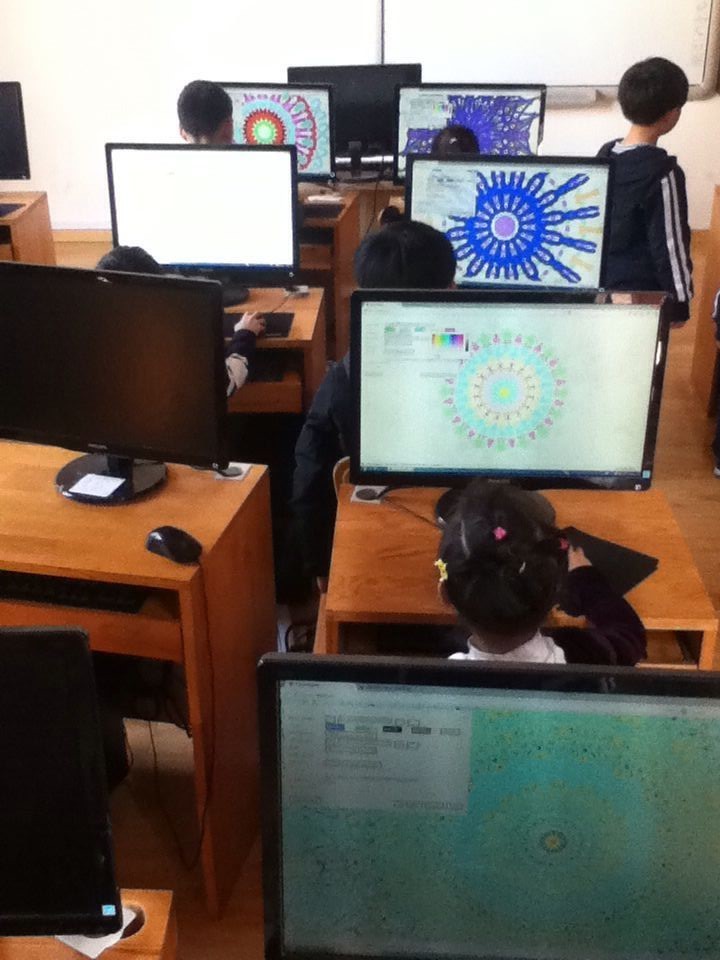
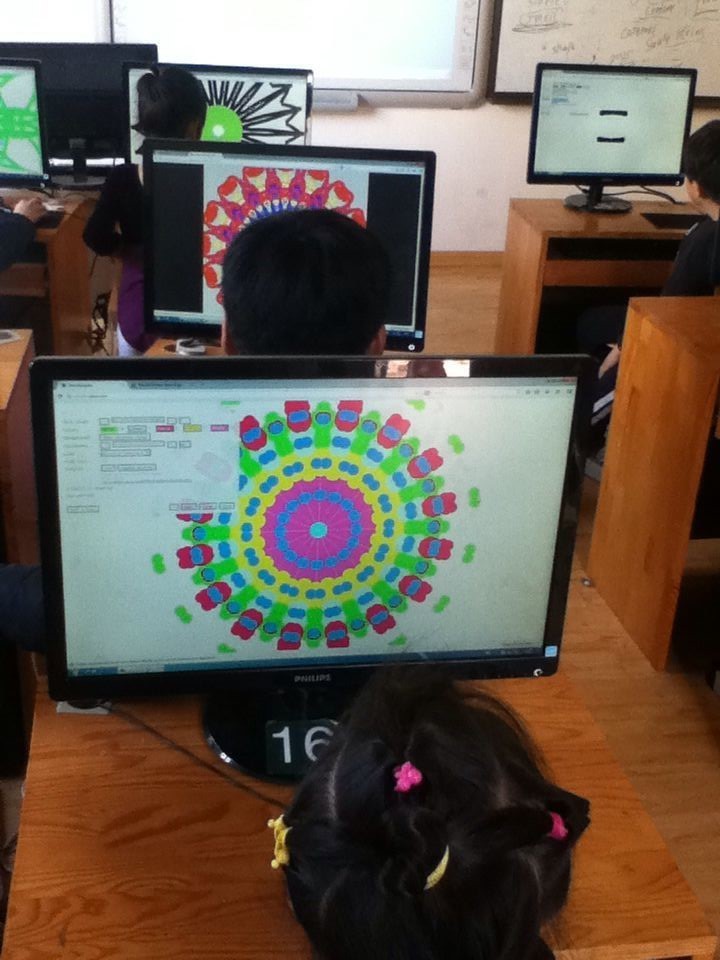
In terms of use, while the initial tsunami is dead, the project was picked up by artists and educators. I can’t post all all the pictures for privacy but I can’t tell you how awesome it feels to receive pictures like these:

Kids enjoying a Mandala making lab somewhere in China

19518702961134851451


Artist Peter Draws created more amazing work:

peterdraws


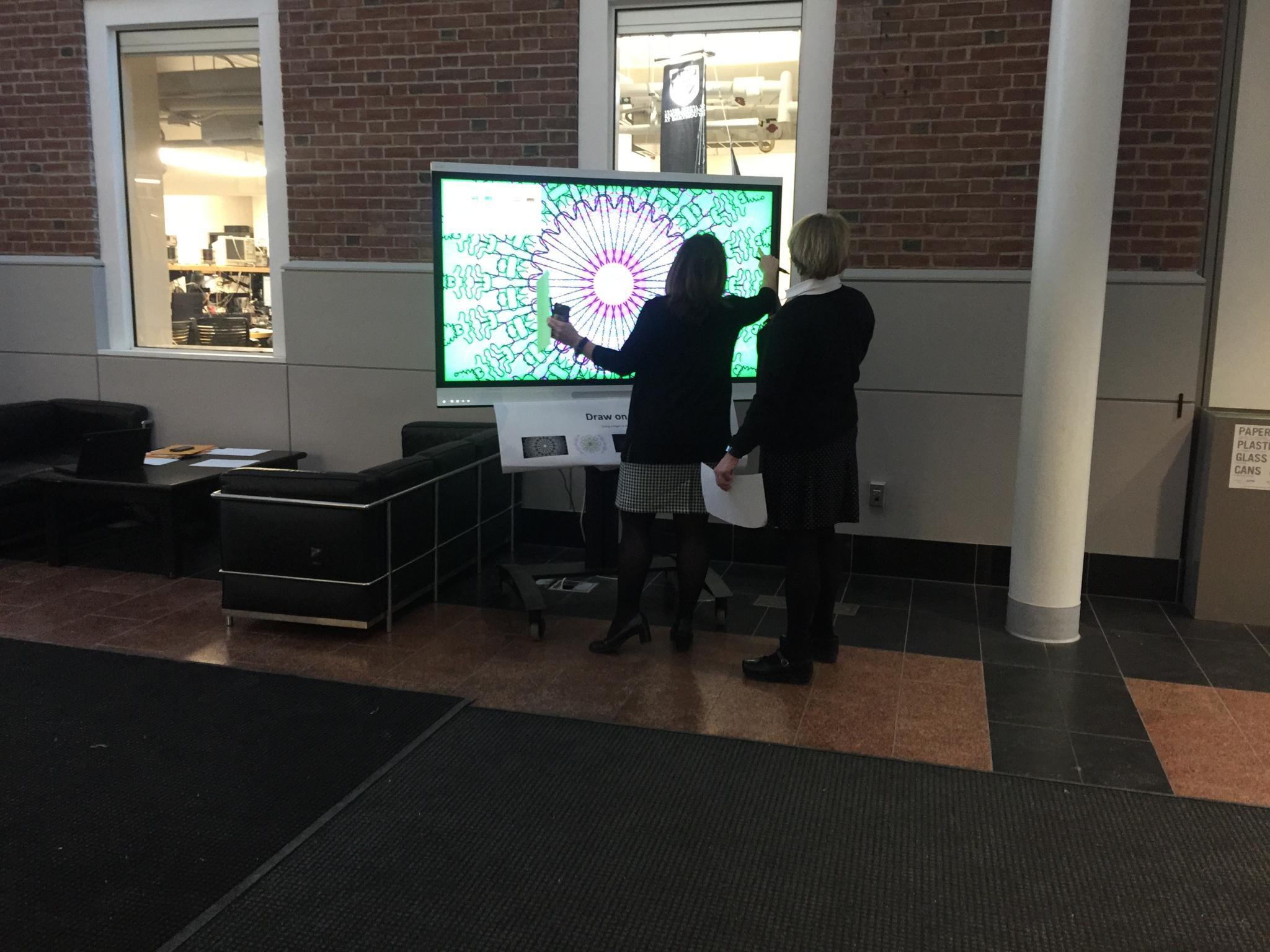
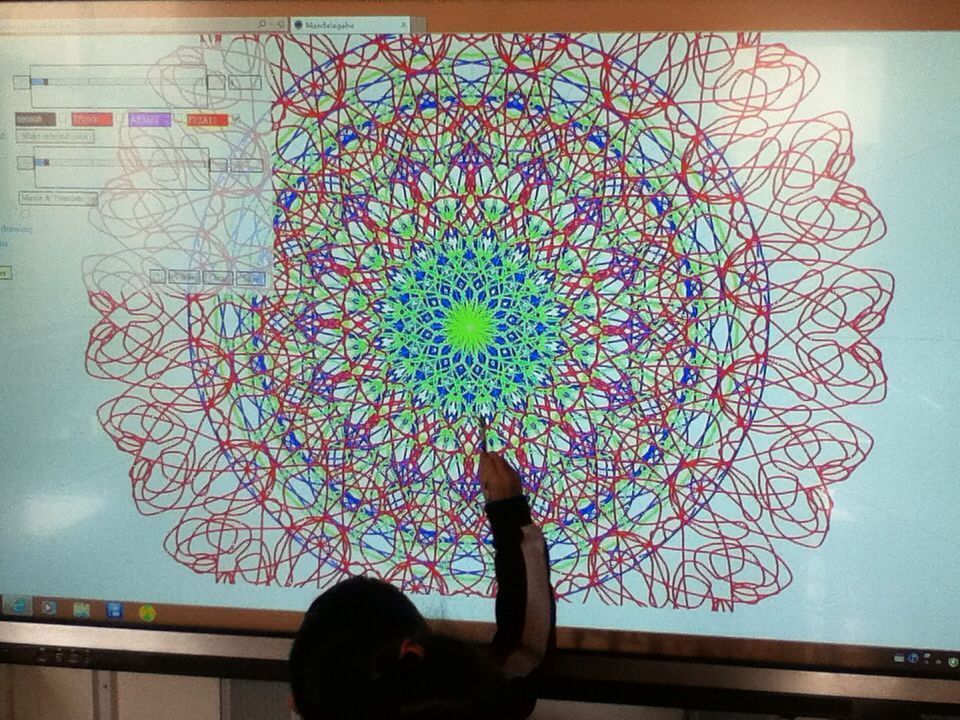
The mandala maker was deployed on big touch screens which turned it into a more social activity much like arcade games.

IMG_8010IMG_0485


Here’s draw.akrin.com: Click to pop out.

I.T., web development ben February 04, 2017

HTML Canvas smooth drawing & websocket live collaboration

Intro

For a while I’ve been polishing a way to have not only a smooth drawing/writing algorithm for HTML Canvasses, but also have it be “streamed” over the network for live collaboration. While the work has been mostly integrated into projects such as Mandalagaba, here I present it in its most basic form so that it may be dissected.

Demo

Draw by dragging your mouse/finger/stylus bellow, fire up another browser to test network repeat. Canvas is used by others online (sorry for anything obsene the internet has left on it) and cleared every hour.

Quick start

  1. download & decompress html_canvas_smooth_writing.tar.gz
  2. if you don’t have it already, install NodeJS
  3. run the websocket server

    [code]node websocket_server.js[/code]

  4. edit index.html and replace all occurences of “ben.akrin.com”  by the host/ip which is running your websocket server. If you are testing on your computer, 127.0.0.1 will do. Alternatively, you can leave it set to “ben.akrin.com” and use my websocket server, in which case step 2 & 3 aren’t necessary, and you’ll have limited latitude as to how many changes you can implement. But it’s perfect for just trying & dissecting the code.
  5. navigate to index.html

(tested on Mac, Raspbian & Ubuntu)

Rendering Pen Strokes

The usual method

Drawing on an HTML Canvas is usually done by collecting coordinates at which “touch” is being detected and drawing straight lines in between. While this makes for a simple implementation with decent results it has multiple issues:

  • straight lines do not represent well the curvatures of human drawing & writing
  • the joins between lines of various orientations can add seams
  • these problems are exacerbated on devices which sample touch slowly, resulting in less coordinates to represent a pen stroke

Here is a classic example of what this looks like:

IMG_0196The quadratic curve method

To make drawing and writing smoother, we use quadratic curves to link our coordinates. Here’s a basic explanation of how it works:

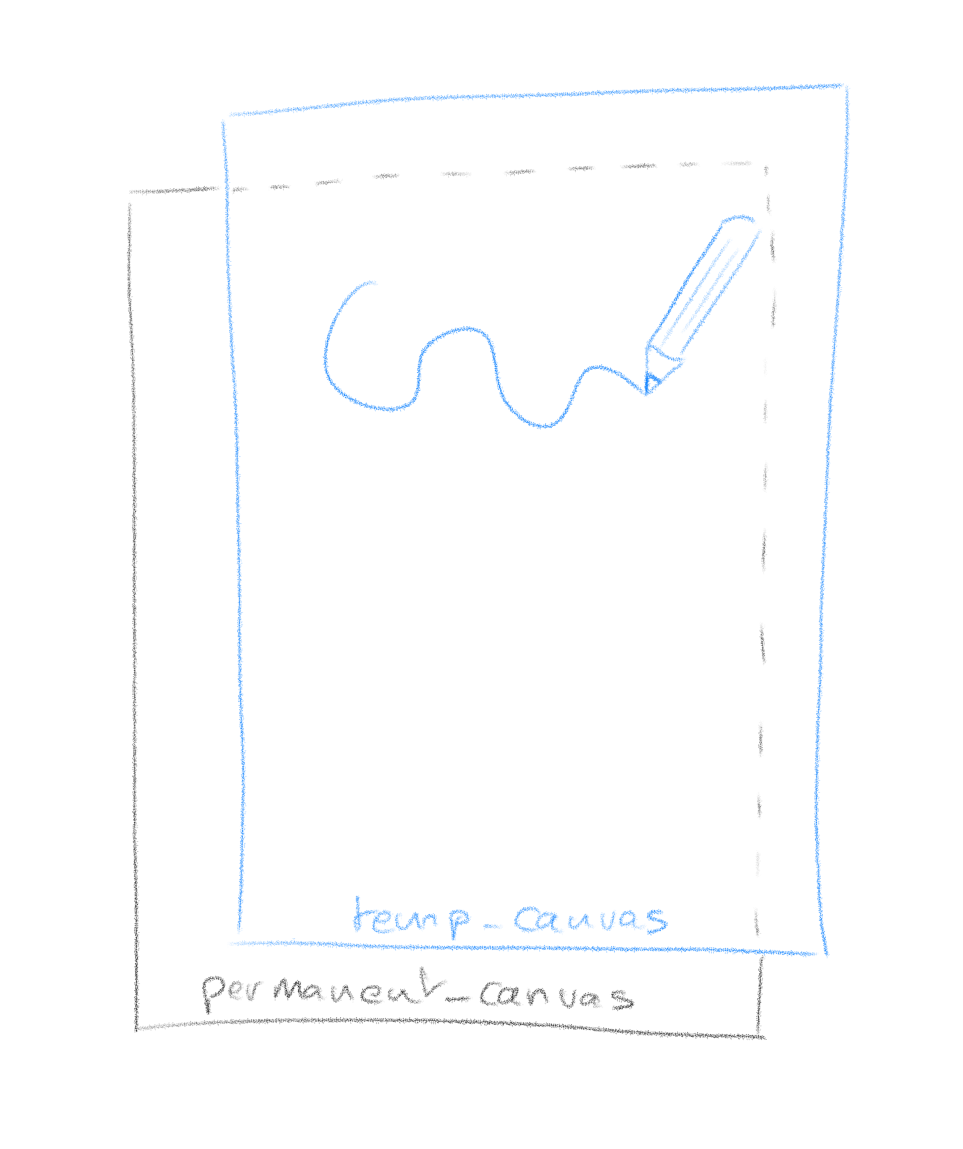
you need 2 canvasses overlaid on top of each other (z-index is highly relevant here). The way it works is that the top canvas is the one that you draw on.
IMG_0197IMG_0198

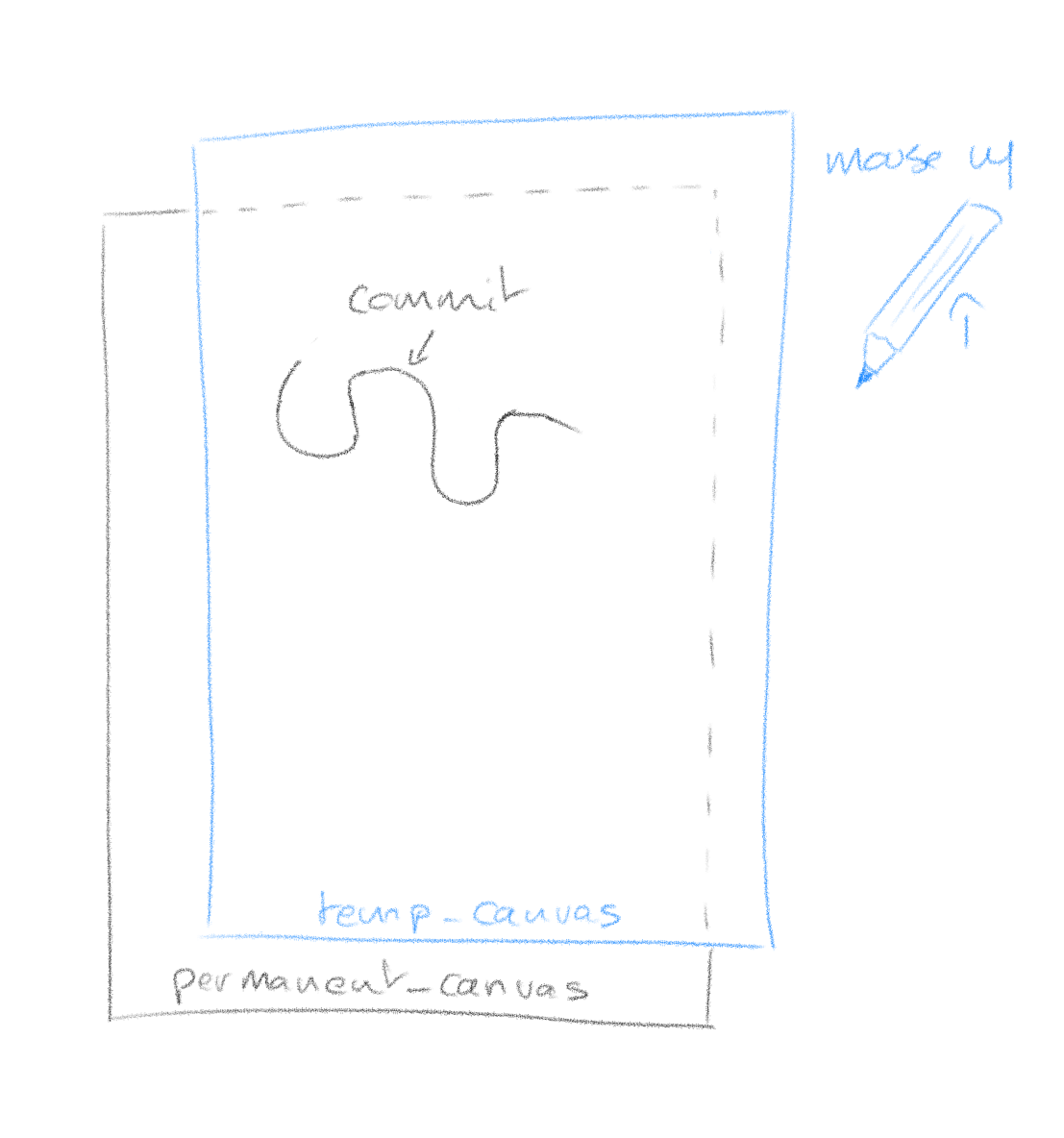
The reason for this is that a pen stroke is getting redrawn entirely every time new coordinates come in. This is because with quadratic curving, the final shape of a stroke is never fully known until all coordinates are. So every time coordinates come in (mouse move event),  we clear the temp_canvas and redraw the whole stroke. The operation happens fast enough that it is invisible.

When you are finished with your stroke (mouse up event), the temp_canvas is cleared and the whole stroke is committed (redrawn) on the permanent canvas.

What it looks like with our quadratic curving algorithm:

IMG_0201

Network Streaming

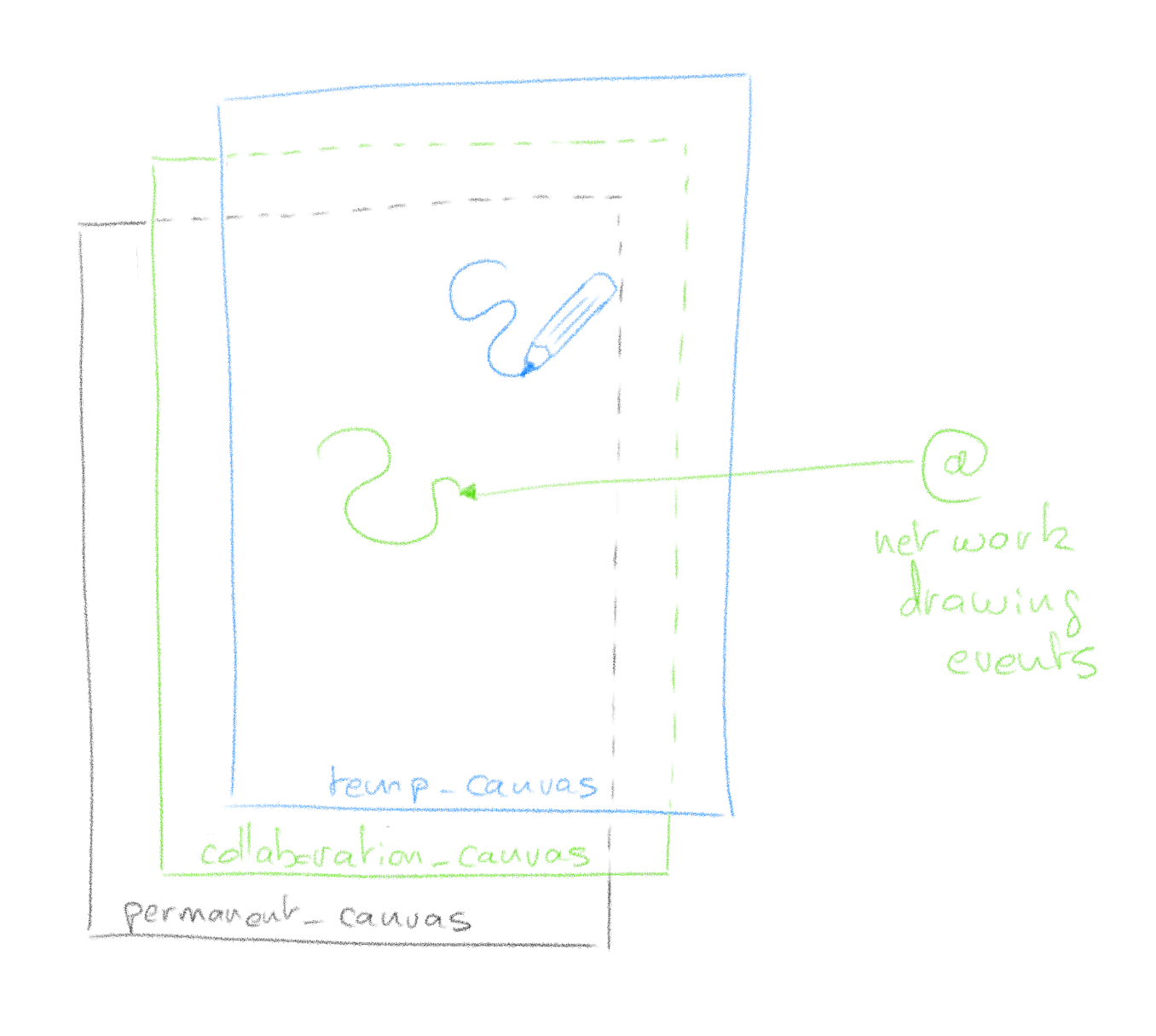
Here is how we add network streaming to the pen strokes. Emitting your pen stroke to other clients is easy, you simply blast your current coordinates to a websocket which will repeat it to other clients. When you receive coordinates from other clients though, you can’t use temp_canvas to render them as it might conflict with your current drawing. To this effect we add yet another canvas between permanent_canvas and temp_canvas which will render network events.

IMG_0199IMG_0200

Much like temp_canvas, collaboration_canvas is meant for temporary rendering and when other clients finish their pen stroke (mouse up), the instruction to commit to the permanent canvas is sent through the websocket.

That’s it

It’s hard for me to document every step of the code; I don’t know your coding level, it’s asynchronous and has lots of bits & pieces which serve specific purposes. I hope however with the basic theory explained, and the code boiled down to its essentials, that you can dissect it easily. Feel free to use the comments section for questions.

I.T., web development ben June 16, 2016

Adding collaborative editing to the Ace web code editor with web sockets

Using Ace‘s excellent API, it is relatively easy to enhance it to allow for live collaborative editing.

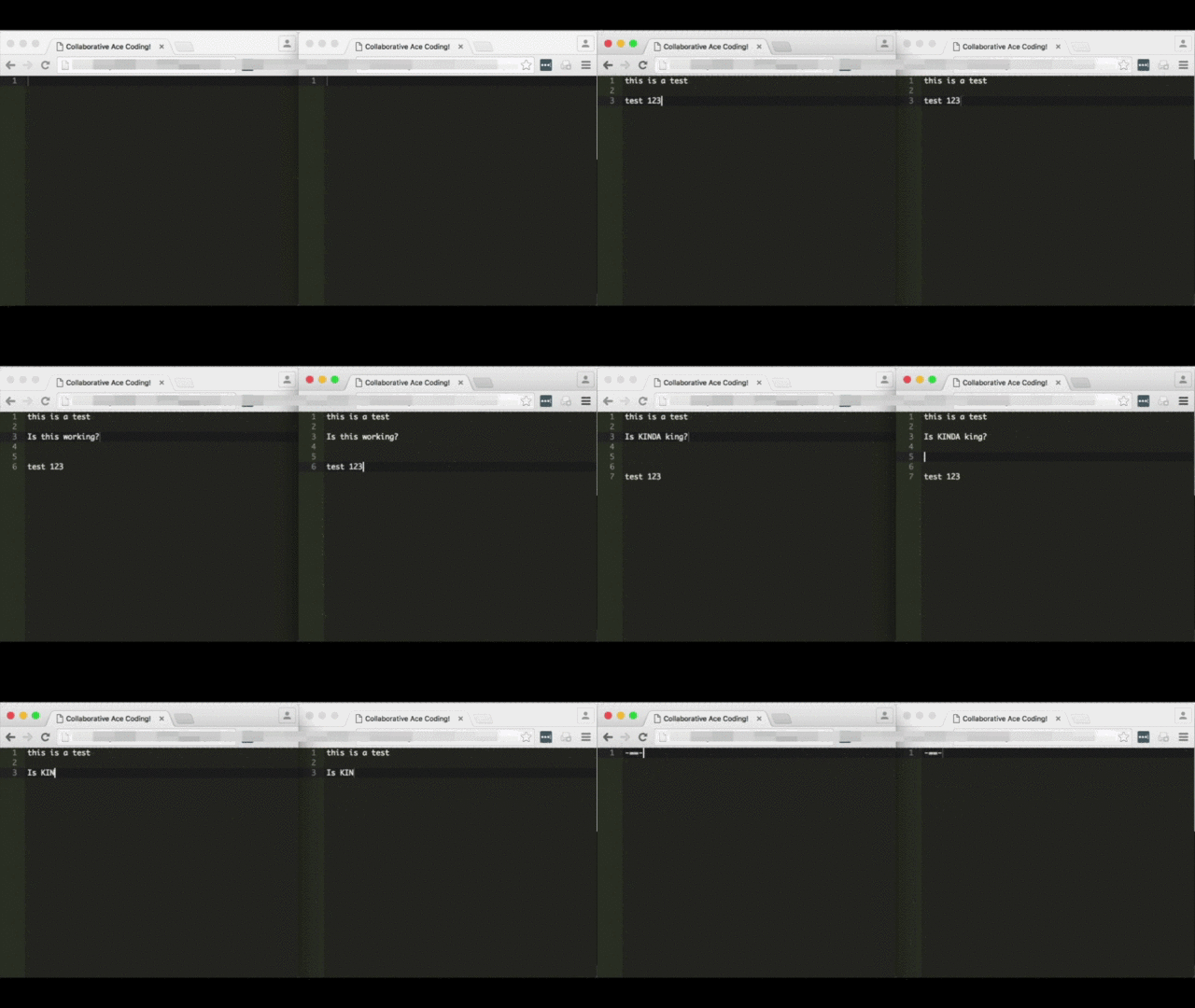
The gist of what we’re doing here is to use Ace’s API for extracting and applying delta when changes occur in the editor. Then we simply transmit them over a websocket that all clients are connected to. This example is functional but in no way comprehensive to what a full code editing collaboration could be. It’s meant to be simple thus understandable. It’s a great starting point for whatever other pieces of functionality you want to send across web sockets.

Loading Ace in a webpage with some custom Javascript

This is what your web page looks like, load Ace as instructed and add Javascript to handle interaction with the websocket server.

[php]
<!DOCTYPE html>
<html lang="en">
    <head>

        <title>Collaborative Ace Coding!</title>

        <style type="text/css" media="screen">
            #editor {
                position: absolute;
                top: 0;
                right: 0;
                bottom: 0;
                left: 0;
            }
        </style>

        <script src="https://<?=$_SERVER[‘HTTP_HOST’]?>:1337/socket.io/socket.io.js"></script>
        <script src="ace-builds/src/ace.js" type="text/javascript" charset="utf-8"></script>
        <script src="ace-builds/src/ext-language_tools.js"></script>
        <script>
            var session_id = null ;
            var editor = null ;
            var collaborator = null ;
            var buffer_dumped = false ;
            var last_applied_change = null ;
            var just_cleared_buffer = null ;

            function Collaborator( session_id ) {
                this.collaboration_socket = io.connect( "https://code.thayer.dartmouth.edu:1337", {query:’session_id=’ + session_id} ) ;

                this.collaboration_socket.on( "change", function(delta) {
                    delta = JSON.parse( delta ) ;
                    last_applied_change = delta ;
                    editor.getSession().getDocument().applyDeltas( [delta] ) ;
                }.bind() ) ;

                this.collaboration_socket.on( "clear_buffer", function() {
                    just_cleared_buffer = true ;
                    console.log( "setting editor empty" ) ;
                    editor.setValue( "" ) ;
                }.bind() ) ;
            }

            Collaborator.prototype.change = function( delta ) {
                this.collaboration_socket.emit( "change", delta ) ;
            }

            Collaborator.prototype.clear_buffer = function() {
                this.collaboration_socket.emit( "clear_buffer" ) ;
            }

            Collaborator.prototype.dump_buffer = function() {
                this.collaboration_socket.emit( "dump_buffer" ) ;
            }

            function body_loaded() {

                session_id = "meow" ;

                editor = ace.edit( "editor" ) ;
                collaborator = new Collaborator( session_id ) ;
                

                // registering change callback
                editor.on( "change", function( e ) {
                    // TODO, we could make things more efficient and not likely to conflict by keeping track of change IDs
                    if( last_applied_change!=e && !just_cleared_buffer ) {
                        collaborator.change( JSON.stringify(e) ) ;
                    }
                    just_cleared_buffer = false ;
                }, false );

                editor.setTheme( "ace/theme/monokai") ;
                editor.$blockScrolling = Infinity ;

                collaborator.dump_buffer() ;

                document.getElementsByTagName(‘textarea’)[0].focus() ;
                last_applied_change = null ;
                just_cleared_buffer = false ;
            }
        </script>
    </head>

    <body onLoad="body_loaded()">
        <div id="editor"></div>
    </body>
</html>
[/php]

Parallel to this, run the following Node.js server script

Following is the Node.js websocket server which must be instantiated on the same server serving the web page above. It needs to be up for the page above to work.

  1. Make sure to have port 1337 open in the same capacity as ports 80 & 443, this is what this listens on.
  2. Make sure to update the paths to SSL certs, we use SSL on the websocket server. We do SSL here so browsers can run the websocket Javascript regardless of whether their original context it SSL or not.
  3. You need to have Socket.IO installed

[javascript]
// config variables
verbose = false ;
session_directory = "/tmp" ; // it has to exist

/* https specific */
var https = require(‘https’),
    fs =    require(‘fs’);

var options = {
    key:    fs.readFileSync(‘/path/to/your/ssl.key’),
    cert:   fs.readFileSync(‘/path/to/your/ssl.crt’),
    ca:     fs.readFileSync(‘/path/to/your/CA.crt’)
};
var app = https.createServer(options);
io = require(‘socket.io’).listen(app);     //socket.io server listens to https connections
app.listen(1337, "0.0.0.0");

// will use the following for file IO
var fs = require( "fs" ) ;

//io = require(‘socket.io’).listen(2015) ;
if( verbose ) { console.log( "> server launched" ) ; }

collaborations = [] ;
socket_id_to_session_id = [] ;

io.sockets.on(‘connection’, function(socket) {
    var session_id = socket.manager.handshaken[socket.id].query[‘session_id’] ;

    socket_id_to_session_id[socket.id] = session_id ;

    if( verbose ) { console.log( session_id + " connected on socket " + socket.id ) ; }

    if( !(session_id in collaborations) ) {
        // not in memory but is is on the filesystem?
        if( file_exists(session_directory + "/" + session_id) ) {
            if( verbose ) { console.log( "   session terminated previously, pulling back from filesystem" ) ; }
            var data = read_file( session_directory + "/" + session_id ) ;
            if( data!==false ) {
                collaborations[session_id] = {‘cached_instructions’:JSON.parse(data), ‘participants’:[]} ;
            } else {
                // something went wrong, we start from scratch
                collaborations[session_id] = {‘cached_instructions’:[], ‘participants’:[]} ;
            }
        } else {
            if( verbose ) { console.log( "   creating new session" ) ; }
            collaborations[session_id] = {‘cached_instructions’:[], ‘participants’:[]} ;
        }
    }
    collaborations[session_id][‘participants’].push( socket.id ) ;

    socket.on(‘change’, function( delta ) {
        if( verbose ) { console.log( "change " + socket_id_to_session_id[socket.id] + " " + delta ) ; }
        if( socket_id_to_session_id[socket.id] in collaborations ) {
            collaborations[socket_id_to_session_id[socket.id]][‘cached_instructions’].push( ["change", delta, Date.now()] ) ;
            for( var i=0 ; i<collaborations[session_id][‘participants’].length ; i++ ) {
                if( socket.id!=collaborations[session_id][‘participants’][i] ) {
                    io.sockets.socket(collaborations[session_id][‘participants’][i]).emit( "change", delta ) ;
                }
            }
        } else {
            if( verbose ) { console.log( "WARNING: could not tie socket_id to any collaboration" ) ; }
        }
    });

    socket.on(‘change_selection’, function( selections ) {
        if( verbose ) { console.log( "change_selection " + socket_id_to_session_id[socket.id] + " " + selections ) ; }
        if( socket_id_to_session_id[socket.id] in collaborations ) {
            for( var i=0 ; i<collaborations[session_id][‘participants’].length ; i++ ) {
                if( socket.id!=collaborations[session_id][‘participants’][i] ) {
                    io.sockets.socket(collaborations[session_id][‘participants’][i]).emit( "change_selection", selections ) ;
                }
            }
        } else {
            if( verbose ) { console.log( "WARNING: could not tie socket_id to any collaboration" ) ; }
        }
    });

    socket.on(‘clear_buffer’, function() {
        if( verbose ) { console.log( "clear_buffer " + socket_id_to_session_id[socket.id] ) ; }
        if( socket_id_to_session_id[socket.id] in collaborations ) {
            collaborations[socket_id_to_session_id[socket.id]][‘cached_instructions’] = [] ;
            for( var i=0 ; i<collaborations[session_id][‘participants’].length ; i++ ) {
                if( socket.id!=collaborations[session_id][‘participants’][i] ) {
                    io.sockets.socket(collaborations[session_id][‘participants’][i]).emit( "clear_buffer" ) ;
                }
            }
        } else {
            if( verbose ) { console.log( "WARNING: could not tie socket_id to any collaboration" ) ; }
        }
    });

    socket.on(‘dump_buffer’, function() {
        if( verbose ) { console.log( "dump_buffer " + socket_id_to_session_id[socket.id] ) ; }
        if( socket_id_to_session_id[socket.id] in collaborations ) {
            for( var i=0 ; i<collaborations[socket_id_to_session_id[socket.id]][‘cached_instructions’].length ; i++ ) {
                socket.emit( collaborations[socket_id_to_session_id[socket.id]][‘cached_instructions’][i][0], collaborations[socket_id_to_session_id[socket.id]][‘cached_instructions’][i][1] ) ;
            }
        } else {
            if( verbose ) { console.log( "WARNING: could not tie socket_id to any collaboration" ) ; }
        }
        socket.emit( "buffer_dumped" ) ;
    });

    socket.on(‘disconnect’, function () {
        console.log( socket_id_to_session_id[socket.id] + " disconnected" ) ;
        var found_and_removed = false ;
        if( socket_id_to_session_id[socket.id] in collaborations ) {
            //var index = collaborations[socket_id_to_session_id[socket.id]].participants.indexOf( socket.id ) ;
            var index = collaborations[socket_id_to_session_id[socket.id]][‘participants’].indexOf( socket.id ) ;
            if( index>-1 ) {
                //collaborations[socket_id_to_session_id[socket.id]].participants.splice( index, 1 ) ;
                collaborations[socket_id_to_session_id[socket.id]][‘participants’].splice( index, 1 ) ;
                found_and_removed = true ;
                //if( collaborations[socket_id_to_session_id[socket.id]].participants.length==0 ) {
                if( collaborations[socket_id_to_session_id[socket.id]][‘participants’].length==0 ) {
                    if( verbose ) { console.log( "last participant in collaboration, committing to disk & removing from memory" ) ; }
                    // no one is left in this session, we commit it to disk & remove it from memory
                    write_file( session_directory + "/" + socket_id_to_session_id[socket.id], JSON.stringify(collaborations[socket_id_to_session_id[socket.id]][‘cached_instructions’]) ) ;
                    delete collaborations[socket_id_to_session_id[socket.id]] ;
                }
            }
        }
        if( !found_and_removed ) {
            console.log( "WARNING: could not tie socket_id to any collaboration" ) ;
        }
        console.log( collaborations ) ;
    });

});

function write_file( path, data ) {
    try {
        fs.writeFileSync( path, data ) ;
        return true ;
    } catch( e ) {
        return false ;
    }
}

function read_file( path ) {
    try {
        var data = fs.readFileSync( path ) ;
        return data ;
    } catch( e ) {
        return false
    }
}

function file_exists( path ) {
    try {
        stats = fs.lstatSync( path ) ;
        if (stats.isFile()) {
            return true ;
        }
    } catch( e ) {
        return false ;
    }
    // we should not reach that point
    return false ;
}
[/javascript]

I.T., web development ben April 16, 2014

PHP 2-dimensional array sorting algorithms

For 2-dimensional arrays looking like:

[code]
Array
(
[0] => Array
(
[id] => 1
[name] => roger
[age] => 31
)

[1] => Array
(
[id] => 2
[name] => brutus
[age] => 24
)

[2] => Array
(
[id] => 3
[name] => ganesh
[age] => 92
)

)
[/code]

I find that comb sort is usually the fastest but its worst case is much worst than quick sort so it could become a bottleneck depending on your data.

[php]
<?php

ini_set( ‘memory_limit’, ‘128M’ ) ;

/**
* @desc bubble_sort for 2 dimensional array (all the arrays of the 2nd dimension need to have the field $sort_by)
* @param array^2 $data the array of arrays
* @param string $sort_by the parameter that will be used for comparison
* @param string $sort_direction "asc": ascending, "desc": descending
*/
function bubble_sort( $data, $sort_by, $sort_direction ) {
if( $sort_direction==’asc’ ) {
for( $i=1 ; $i<count($data) ; $i++ ) {
for( $j=1 ; $j<count($data) ; $j++ ) {
if( $data[$j-1][$sort_by]>$data[$j][$sort_by] ) {
$temp = $data[$j-1] ;
$data[$j-1] = $data[$j] ;
$data[$j] = $temp ;
}
}
}
} else {
for( $i=1 ; $i<count($data) ; $i++ ) {
for( $j=1 ; $j<count($data) ; $j++ ) {
if( $data[$j-1][$sort_by]<$data[$j][$sort_by] ) {
$temp = $data[$j-1] ;
$data[$j-1] = $data[$j] ;
$data[$j] = $temp ;
}
}
}
}
return $data ;
}

/**
* @desc comb_sort for 2 dimensional array (all the arrays of the 2nd dimension need to have the field $sort_by)
* @param array^2 $data the array of arrays
* @param string $sort_by the parameter that will be used for comparison
* @param string $sort_direction "asc": ascending, "desc": descending
*/
function comb_sort( $data, $sort_by, $sort_direction ) {
$gap = count( $data ) ;
$swaps = -1 ;
while( !($gap<=1 && $swaps==0) ) {
if( $gap>1 ) {
$gap = $gap/1.3 ;
if( $gap==10 || $gap==9 ) {
$gap = 11 ;
}
}
$i = 0 ;
$swaps = 0 ;
while( !(($i+$gap)>=count($data)) ) {
if( ($sort_direction==’asc’ && $data[$i][$sort_by]>$data[$i+$gap][$sort_by]) ||
($sort_direction==’desc’ && $data[$i][$sort_by]<$data[$i+$gap][$sort_by]) ) {
$temp = $data[$i] ;
$data[$i] = $data[$i+$gap] ;
$data[$i+$gap] = $temp ;
$swaps = 1 ;
}
$i++ ;
}
}

return $data ;
}

/**
* @desc quick_sort for 2 dimensional arrays (all the arrays of the 2nd dimension need to have the field $sort_by)
* @param array^2 $data the array of arrays
* @param string $sort_by the parameter that will be used for comparison
* @param string $sort_direction "asc": ascending, "desc": descending
*/
function quick_sort( $data, $sort_by, $sort_direction ) {
if( count($data)<=1 || $sort_by==” ) {
return $data ;
} else {
$pivot = $data[0][$sort_by] ;
$x = $y = array() ;
for( $i=1 ; $i<count($data) ; $i++ ) {
if( $data[$i][$sort_by]<$pivot ) {
if( $sort_direction=="asc" ) {
$x[] = $data[$i] ;
} else {
$y[] = $data[$i] ;
}
} else {
if( $sort_direction=="asc" ) {
$y[] = $data[$i] ;
} else {
$x[] = $data[$i] ;
}
}
}
return array_merge( quick_sort($x, $sort_by, $sort_direction), array($data[0]), quick_sort($y, $sort_by, $sort_direction) ) ;
}
}
?>
[/php]

I.T., web development ben November 20, 2013

Pulling the number keyboard in iOS' Safari while disabling client side input validation

Safari on iOS allows you to pull a specific keyboard for an input field. For example if I have a field expecting numeric input, we’ll make sure that our input has the attribute of “number” rather than the usual “text” as such:

[html]<input type="number"/>[/html]

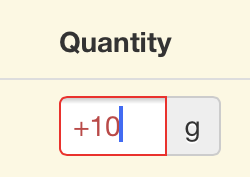
This will save users a few clicks; however Safari forces input validation on the client-side when you do that. Meaning if you wanted a numeric keyboard by default while allowing other characters, you input will fail.

IMG_0798

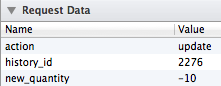
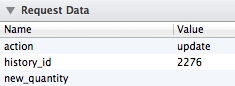
Not only is it highlighted in red, this.value also returns null as opposed to what is clearly in the field, rendering it unusable.

When the field is set to “-10”

Screen Shot 2013-11-20 at 10.14.10 AM

When the field is set to “+10”

Screen Shot 2013-11-20 at 10.14.03 AM

One would think that explicitly defining a pattern to check for would let Safari know that we are interested in trumping its input validation but such is not the case. As a result, the following does not help our cause:

[html]<input type="number" pattern="(-+){0,1}[0-9]{1,}">[/html]

So here’s a completely hackish way to get the keyboard you want with no input validation:

[html]<input type="number" pattern="(-+){0,1}[0-9]{1,}" onFocus="that=this; setTimeout(function(){ that.setAttribute(‘type’,’text’); },10);" onBlur="that=this; setTimeout(function(){ that.setAttribute(‘type’,’number’); },10);"/>;[/html]

That’s right, after iOS pulled the right keyboard, we change the field type to “text”. Note that the client will still display some red around the field as it will perform the validation but at least this.value will return what’s in the friggin’ field.

Note 1: the setTimeout is necessary, if we perform the change immediately onFocus, safari pulls the text keyboard.

Note 2: the that=this indirection is necessary to save a reference of the object to the context of setTimeout.

I.T., miscellaneous, web development ben June 26, 2013

A website to make the meal math easier on the parents

https://yum.akrin.com

List of current features:

  1. It uses the USDA National Nutrient Database as the basis for all the foods you can search (your tax dollars at work).
  2. You can add your own recipes, ingredients whatever else is not in the base database. We find that we add all the foods we use even if it’s just bread because a bread with a label is always more accurate than the generic/average bread as defined in the USDA database. It’s also nice for adding your family specials once and for all and never have to do the math again.
  3. What you add is not shared amongst users and it only visible to you.
  4. It tries to learn which foods come back to help pick them later on.
  5. It remembers which amounts you last used
  6. Calculates insulin dose on the fly
  7. Very simple & streamlined navigation for the least work for the parents

This is still very much a work in progress but has made our meals a lot more agreeable already.

Posts pagination

← Previous 1 2

This blog is solar powered

Interactive

Handwriting Capture
Mandalagaba
IPv6 link-local to MAC converter
IPv6 MAC to link-local converter
Markov Text Generation
Markov Word Generation
Markov Music Generation
Duplogrifier
Flood Fill Algorithms
Homestead Metrics
RGB Playground
Web Games

Categories

  • aesthetics111
    • plots54
    • specular holography6
  • Books3
  • I.T.202
    • 3D modeling / printing21
    • AI6
    • all out geekery36
    • electronics27
    • homestead automation6
    • maniacal paranoia25
    • plotters49
    • unix / linux29
    • video games4
    • web development29
    • web games3
  • Lego / Duplo67
  • life in the U.S.42
  • miscellaneous202
  • nature encounters114
  • old vinyls3
  • organs2
  • self sustainability560
    • agriculture105
    • apiculture38
    • apple20
    • building131
    • canning3
    • crochet6
    • foraging6
    • hunting10
    • maple syrup47
    • poultry39
    • preserving2
    • solar power28
    • water23
    • wood84
  • trip to a new life6
Theme by Bloompixel. Proudly Powered by WordPress