Sending ZFS snapshots across the wires can be done via multiple mechanisms. Here are examples of how you can go about it and what the strengths and weaknesses are for each approach.
SSH
strengths: encryption / 1 command on the sender
weaknesses: slowest
command:
zfs send tank/volume@snapshot | ssh user@receiver.domain.com zfs receive tank/new_volume
NetCat
strengths: pretty fast
weaknesses: no encryption / 2 commands on each side that need to happen in sync
command:
on the receiver
netcat -w 30 -l -p 1337 | zfs receive tank/new_volume
on the sender
zfs send tank/volume@snapshot | nc receiver.domain.com 1337
(make sure that port 1337 is open)
MBuffer
strengths: fastest
weaknesses: no encryption / 2 commands on each side that need to happen in sync
command:
on the receiver
mbuffer -s 128k -m 1G-I 1337 | zfs receive tank/new_volume
on the sender
zfs send tank/volume@snapshot | mbuffer -s 128k -m 1G -O receiver.domain.com:1337
(make sure that port 1337 is open)
SSH + Mbuffer
strengths: 1 command / encryption
weaknesses: seems CPU bound by SSH encryption, may be a viable option in the future?
command:
zfs send tank/volume@snapshot | mbuffer -q -v 0 -s 128k -m 1G | ssh root@receiver.domain.com 'mbuffer -s 128k -m 1G | zfs receive tank/new_volume'

Finally, here is a pretty graph of the relative time each approach takes:
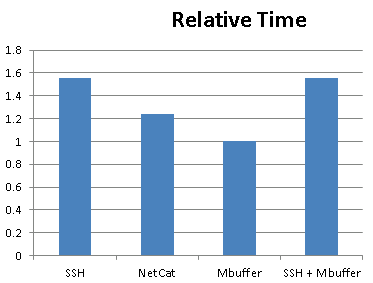 SSH + MBuffer would seem like the best of both worlds (speed & encryption), unfortunately it seems as though CPU becomes a bottleneck when doing SSH encryption.